find-deleted-facebook-ads
Find Deleted Facebook Ads: What’s Possible, What’s Not, and How Advertisers Still Research Them
By
Kinnari Ashar

An ad can run steadily on Facebook and then disappear overnight. No warning. No explanation. For anyone watching competitors, that sudden drop raises questions that Meta never answers clearly.
Was the ad paused, did it stop naturally, or was it removed on purpose?
Ads stop showing for many reasons. Some are paused manually. Some end because the budget or schedule runs out. A small number are truly removed. Each case leaves different traces, and mixing them up leads to bad research and wrong assumptions about what is working.
This guide is for dropshippers, media buyers, agencies, and brand owners who study competitor ads to make faster, less-guesswork decisions.
You will see what Facebook shows publicly, what only ad owners can access, how spy tools still extract signals, and where the limits are real.
Key Takeaways
Once a Facebook ad is deleted, you usually cannot get it back. If it was not seen or saved while live, it is gone.
Ads disappear for many reasons. Deleted, paused, and inactive ads are not the same thing, and mixing them up leads to wrong conclusions.
Meta’s own tools only help if you own the ad. They are not useful for recovering deleted competitor ads.
Ad spy tools do not fetch deleted ads later. They only show ads that were captured while running.
Real ad research comes from watching patterns over time, not chasing one missing ad.
What Happens When a Facebook Ad Is Deleted?
When a Facebook ad is no longer visible, the first instinct is to think the advertiser removed it on purpose. In most cases, that assumption is wrong. Ads can stop showing for several routine reasons, and each one changes what information is still available to someone analyzing competitors.
Facebook ads usually fall into four different states:
Active ads are live and delivering impressions
Paused ads are stopped manually, but can be restarted
Inactive ads end automatically due to budget or schedule
Deleted ads are removed from the account interface entirely
Deleting an ad does not erase it from history. The ad is still stored for internal records and policy reasons, but it is closed off from normal use. Advertisers cannot edit it or reuse it in any form. Many remove ads after a test fails or when cleaning up cluttered accounts. To anyone outside the account, it appears as if that ad never ran at all.
This is why deleted ads vanish from public tools. Facebook only shows ads that are currently running or recently inactive. Once an ad is deleted, it no longer qualifies for public display, even if it ran for weeks before.
Can You Find Deleted Facebook Ads Using Meta’s Official Tools?
Yes, but only if you own the ads. Meta’s official tools do not let you find deleted ads for competitor research. Advertisers can review their own deleted ads inside their accounts, but once a competitor removes an ad, Meta does not keep it publicly accessible.
1. Using the Meta Ads Library
The Meta Ads Library is often the first place people check when researching competitors, but it shows current advertising activity and does not preserve everything a brand has ever run.
When you search inside the Ads Library, you are mainly looking at ads that are live right now. You may also see ads that stopped running recently. These are usually ads that were paused by the advertiser or ended when the campaign finished. This short overlap period is why some ads appear to be deleted even though they are still visible.
What the Ads Library does not give you is access to ads that were fully removed. Once an advertiser deletes an ad, it does not stay available for browsing. Creatives that were tested, failed, and later removed are not stored in any public view. There is no scroll-back feature and no way to rebuild a full testing history.
There are a few situations where ads stay visible longer. Ads removed for policy reasons can remain accessible for transparency. Certain regulated categories, such as political or issue-based ads, may also stay visible longer in some regions due to local rules.
If you want to catch ads before they disappear, you need to check them the right way and at the right time:
Open the Ads Library and select the country. Ads only appear in locations where they were delivered, so this controls what you can see.

Choose the correct ad category before searching. A wrong category can hide ads that are actually running.
Search using the advertiser’s Facebook Page name if available. If not, use the brand name or a related product keyword to surface connected pages.
Review the ad status labels. Ads marked Active are still running. Ads marked Inactive stopped recently and are often the most useful for research.
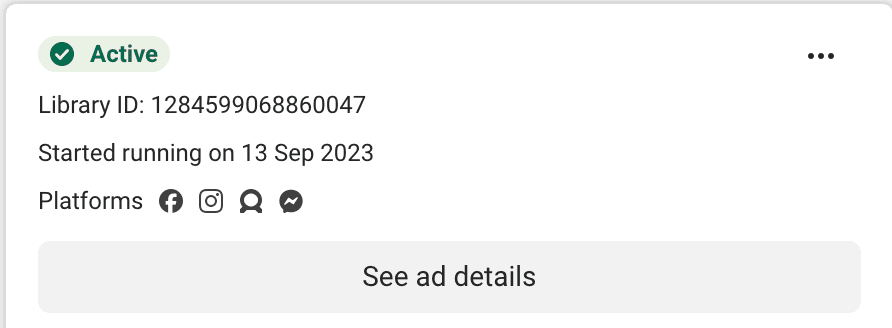
Open individual ads and check the delivery start date. Ads that launched recently and went inactive quickly usually indicate short tests.
Visit the same advertiser again after a few days. Ads that disappear completely were likely deleted, while ads that remain inactive are still accessible.
2. Using Meta Ads Manager (Ad Owners Only)
This only applies to ads you own. There is no workaround here. Ads Manager does not show deleted ads from competitors, and Meta has never allowed that.
Inside Meta Ads Manager, deleting an ad does not erase it right away. Meta keeps deleted ads around for account records, billing history, and internal review. You can still pull them up by filtering your ads based on delivery status and selecting Deleted. This access usually goes back as far as 37 months.
Even though these ads are locked, the useful parts are still there. You can open them and see the exact creative that ran, read the copy, and check how they performed. Impressions, clicks, spend, and other metrics stay visible during this window. That is why many advertisers still look at deleted ads when reviewing past tests or trying to understand why something was shut off.
Deleted does not mean useless. Advertisers often duplicate deleted ads and relaunch them as fresh versions, or pull out the creative and test it again in a different campaign.
The limitation is strict. This visibility exists only within your own ad account. Deleted ads from competitors cannot be accessed through Meta Ads Manager.
Here’s how you can access your own deleted ads:
Log in to Ads Manager and select the correct ad account you want to review.
Set a wide date range so older ads are included. You can go back as far as 37 months if needed.
Open the Filters menu, select Delivery, and choose Deleted.
Apply the filter and click on individual deleted ads to review creatives, copy, and performance data.
Duplicate a deleted ad if you want to reuse its creative or rebuild a similar campaign in a new setup.
Why Can't Public Tools Recover Deleted Ads?
Public ad tools cannot recover deleted competitor ads because Meta gives advertisers control over what happens to their ads after they stop running. When an advertiser deletes an ad, Meta treats that ad as account-level data and not public content. Once that happens, public tools lose access.
This is where people mix up transparency with recoverability. Transparency means Meta allows limited visibility into ads that are active or recently inactive, so users can see who is advertising. It does not mean Meta keeps every ad available forever. Recoverability would mean letting others view ads that an advertiser chose to remove, and Meta does not allow that through public tools.
Two common myths come from this misunderstanding.
One is that the Ads Library shows everything forever. It does not. It only shows ads that are currently running and some that stopped recently. Once an ad is fully deleted and cleared from visibility, it no longer appears.
Another is that there is a free way to recover deleted ads. There is not. If an ad no longer shows up in public tools, it cannot be retrieved through Meta’s official options.
This is important to understand before looking at third-party tools. If you expect any public or free tool to bring back deleted competitor ads, you will be disappointed. What those tools do instead is capture data earlier, before ads are removed, which is a different approach entirely.
How Third-Party Ad Spy Tools Capture Deleted Facebook Ads?
Third-party ad spy tools do not retrieve deleted ads from Meta. They save ads while those ads are still live. Platforms like Winning Hunter help advertisers monitor and capture competitor creatives before they disappear, which is why timing matters more than recovery.
If the advertiser deletes the ad later, the version stored by the spy tool stays available. Nothing is being pulled after deletion. Everything you see was collected earlier.
Timing is the key factor. Ads that run for longer have more chances to be captured. Ads that launch and get deleted quickly often never appear in any database. This is why some deleted ads show up easily while others leave no trace.
Tools That Can Show Previously Deleted or Inactive Ads
When you look up old competitor ads, you will notice something odd. The same ad might appear in one tool and be missing in another. That is not a bug. It is how these tools work.
Ad spy tools do not pull deleted ads from Facebook. They keep copies of ads they already seen while those ads were running or were saved earlier. If an ad was never captured, it cannot show up later. That is why coverage differs from tool to tool.
Below is a side-by-side look at tools that can surface previously inactive or deleted ads, as long as those ads were recorded before removal.
Tool | What it captures | Can show deleted ads | Strengths | Main limitation |
Foreplay | Saved Facebook and Instagram creatives | Yes, if saved earlier | Strong creative archiving, clear filters | Depends on manual saving |
Vaizle (Free) | Recently inactive ads | Limited | Fast competitor checks | Short history |
BigSpy | Ads seen while active across regions | Yes, if crawlers saw it | Good for short tests | Coverage varies |
Common Mistakes When Analyzing Deleted Facebook Ads
One of the most common mistakes is assuming that a deleted ad failed. Ads are removed for many reasons that have nothing to do with performance. Advertisers clean up accounts or restructure campaigns. Reading every disappearance as a loss leads to wrong conclusions.
Another mistake is overinterpreting short-lived ads. When an ad runs briefly and then vanishes, it is often treated as a hidden test or quiet winner. Many of these ads never made it past early checks or meaningful delivery.
Other frequent mistakes include:
Assuming missing ads mean something is being hidden
Treating one quick check as a full picture
Concluding without watching changes over time
If an ad does not appear in the Ads Library or a spy tool, it is usually a timing issue. The ad was deleted quickly or never captured. That is far more common than deliberate concealment.
The biggest mistake is trying to reconstruct everything a competitor tested. Deleted ads are incomplete by nature. The real value comes from patterns that remain visible, not from chasing every ad that disappeared.
Conclusion
Once a Facebook ad is fully removed, it is usually gone for good. There is no archive to unlock and no shortcut that brings it back. Chasing a single missing ad almost always leads to dead ends and wasted efforts.
The advertisers who get value from ad research do not obsess over what vanished. They pay attention to what repeats. They look for systems behind the ads, not individual creatives. Volume, timing, and consistency reveal far more than any one deleted test ever could.
If you want better signals, the focus has to shift. Capture ads early. Track them while they are live. Watch how creatives rotate and how often brands reset or relaunch. With time, those patterns tell you what is being tested, what is being scaled, and what quietly gets dropped.
FAQs
Can I recover a competitor’s deleted Facebook ad for free?
No. If the ad is gone from public view, it is gone. There is no free tool that pulls it back. If it was not saved or captured while it was running, you missed it. That is how Facebook works. Anyone claiming otherwise is overselling.
Do deleted Facebook ads ever reappear?
Only if the advertiser runs them again. That usually means duplicating the ad or relaunching it inside the account. It shows up as a new ad. Deleted ads do not come back on their own.
How long does Meta keep deleted ads internally?
Up to 37 months, but only for the advertiser who ran them. They stay inside the ad account for records and review. No competitor, tool, or public page can see that data.
Are ad spy tools legal to use?
Yes. They collect ads that were publicly visible while running. The problem is not using the tools. The problem is copying creatives, copying branding, or pretending the ad is yours.
Is it better to track ads before they’re deleted?
Yes. After deletion, most context is lost. While ads are live, you can see timing, changes, and repetition. That information does not exist once the ad disappears.


We already know what works before you even have the chance to blink!
© 2024 WinningHunter.com