how-does-dropshipping-work
How Does Dropshipping Work? Explained With Real Examples
By
Kinnari Ashar
Dropshipping often gets framed as a quick way to start selling online. Add a product, launch ads, and wait for orders to roll in. That version sounds clean, but it skips over the moving parts that actually shape your results. It is one of the reasons the majority of stores never reach stable profits, with only about 10% to 20% managing to make it work long term.
The moment a customer places an order, a sequence begins. Payment needs to clear, product details pass to a supplier, fulfillment starts, and delivery timelines come into play. You are not packing boxes, yet you are still responsible for everything that happens next.
Most explanations stop before this point. They tell you what dropshipping is, but not how the process unfolds after the sale.
In this guide, you will see how dropshipping works, with real examples and practical context. Once you understand what is really happening behind each order, your decisions start to change.
What Is Dropshipping?
Dropshipping is a business model where you sell products without keeping inventory. When a customer places an order on your store, the order is sent to a supplier who ships the product directly to the customer. You do not handle storage, packing, or shipping, but the customer buys from you, not the supplier.
You remain the seller of record, which means you control pricing, branding, and the overall buying experience. The payment comes to you, and you are responsible for what happens after the purchase, including refunds, disputes, and customer communication.
Compared to traditional e-commerce, you do not need to invest in inventory upfront or manage storage. This lowers the barrier to entry, but it also comes with tighter margins and less control over fulfillment since the supplier handles delivery.
How Dropshipping Works: Step-by-Step Workflow
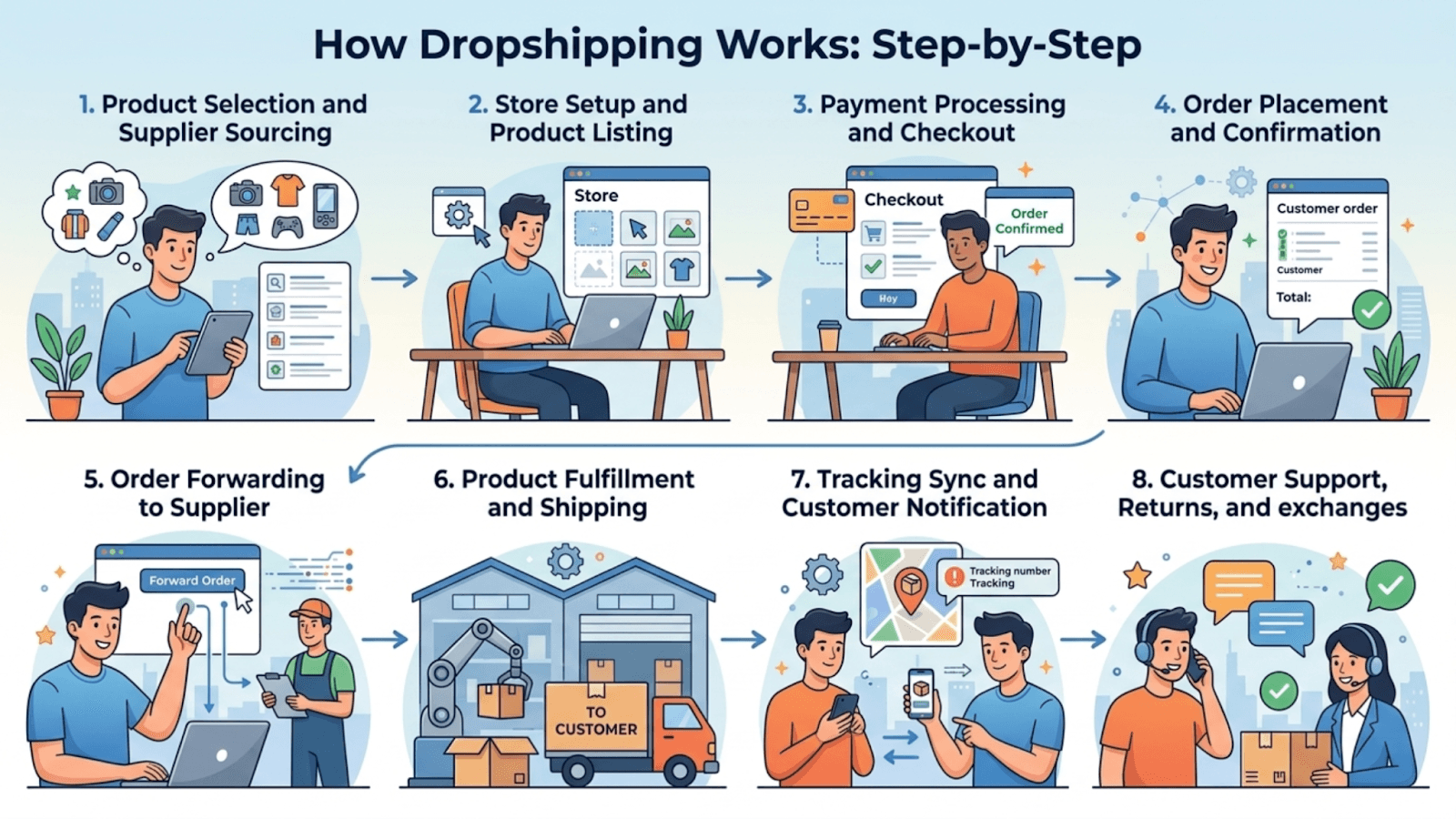
1. Product Selection and Supplier Agreement
This stage decides whether your store runs smoothly or turns into constant damage control. You are choosing the product and the supplier together, and both need to hold up under real orders.
When evaluating a product, start with three checks.
First, demand should already exist. Look for products that are actively being advertised or sold, not ones you are guessing on.
Second, pricing needs room for ads. If the product cost is too close to your selling price, it will not survive paid traffic.
Third, avoid items that are fragile, oversized, or complicated to use, since these tend to create higher return rates and complaints.
Supplier selection matters just as much. Check how consistently they fulfill orders, not just their listed ratings. Look at actual delivery timelines, including processing time, not ideal shipping estimates. Also, confirm how they handle returns, replacements, and damaged items, since this directly affects your customer experience.
2. Store Setup and Product Listing
Once you have a product and a supplier locked in, the next step is turning that into something customers can actually buy. You need a store that presents the product clearly and handles orders without friction. Most sellers use platforms like Shopify or WooCommerce since they allow full control over design, pricing, and customer experience, while also requiring you to bring in your own traffic.
With the store in place, the focus shifts to getting products listed correctly. Supplier connection tools such as DSers, Zendrop, or AutoDS are commonly used to import product details, images, and variants directly into your store. This gives you a starting point, but what gets imported is rarely ready to sell as it is.
Before a product goes live, it needs to be shaped into a page that can actually convert visitors into buyers. That is where the real work happens. Each product page needs to get a few things right:
Pricing that leaves enough margin after product cost and ad spend
Clear shipping timelines so customers know what to expect before buying
Product presentation through images and descriptions that build trust
3. Payment Processing and Checkout Flow
Have you ever tried to place an order and had your payment fail or get stuck for verification? Most people do not try again. That is how sensitive this stage is.
To avoid losing buyers here, you need to set up reliable payment options from the start. Most stores use a combination of Shopify Payments, Stripe, and PayPal so customers can choose what they trust. Limiting options often reduces conversions.
When a customer enters their details, the payment goes through checks such as address validation and card verification. In some cases, an extra step like 3D Secure is triggered. You cannot remove these checks, but you can reduce friction by keeping checkout simple and avoiding unnecessary fields.
From your side, timing matters. The customer pays immediately, but payouts can take a few days, especially on new accounts. You still need to pay your supplier during that window, so keeping a small cash buffer is necessary. Scaling too quickly without this often leads to failed order processing.
To reduce drop-offs at checkout, focus on a few basics:
Show total cost upfront, including shipping
Keep the checkout steps short and clean
Add trust signals like secure payment icons and clear policies
Small improvements here directly affect how many visitors turn into paying customers.
4. Order Placement and Confirmation
Once a customer completes the purchase, the order appears in your store with all the details needed to move forward. You can view the product, customer information, and payment status inside platforms like Shopify or WooCommerce. You should confirm that everything is captured correctly before passing it to your supplier.
At the same time, the customer receives an order confirmation email. This message should clearly confirm the purchase and set expectations around what happens next, especially processing and delivery timelines. If this step is unclear, it can create doubt right after the purchase.
5. Order Forwarding to Supplier
An order sitting in your store means nothing until the supplier has it. This step decides how fast your customer actually gets their product.
You can send orders in three ways. Automation tools can handle it for you by pushing orders directly to the supplier. API based setups do the same thing at a deeper level, usually when you are working with private agents or scaling volume. Manual fulfillment means placing each order yourself through the supplier’s dashboard or sending details over email. That works early on, but breaks quickly once orders increase.
No matter the method, the supplier needs the same inputs. Product, variant, quantity, and the exact shipping details. This is also the point where you pay the supplier, so mistakes here cost you real money.
To avoid issues, focus on a few checks before forwarding:
Match the product variant with what the customer selected
Verify the shipping address format and phone number
Confirm stock availability or processing time with the supplier
Automation reduces effort, but it does not remove responsibility. If the wrong item gets sent, the customer does not blame the supplier. They come back to you.
6. Product Fulfillment and Shipping
After the order is passed to the supplier, fulfillment moves to their side. The product is picked, packed, and handed over to a shipping carrier, which introduces the logistics layer that most sellers do not directly control.
Suppliers work with a mix of international carriers like DHL and local courier networks, depending on destination and cost. This choice directly affects delivery speed and reliability. Orders shipped from local warehouses tend to arrive faster, while cross-border shipments take longer and are more exposed to delays.
Shipping timelines depend on three factors working together. Where the supplier is located, how quickly they process the order, and which shipping method is used. These variables shape the delivery experience, even though the customer only sees your brand.
7. Tracking Sync and Customer Updates
The first “Where is my order?” message usually shows up sooner than expected. Not because something went wrong, but because the customer has no visibility yet.
Once the supplier ships the product, a tracking number is generated. That detail needs to make its way back into your store without delay. Tools can handle this automatically by syncing tracking details as soon as they are available. If you are working manually, you will need to collect the tracking number from your supplier and update it yourself.
To keep customers informed without chasing every update, you can use tools like Klaviyo, Omnisend, or AfterShip. These allow you to send automated emails or SMS updates for order confirmation, shipping, delivery, returns, and even cancellations, so customers always know what is happening.
As soon as tracking is in place, your store should notify the customer with a working tracking link and a realistic delivery window. If this step is delayed, customers assume the order has not been shipped, even when it has.
8. Customer Support, Returns, and Refunds
A customer receives the wrong item or opens a damaged package. They don’t think about your supplier. They expect you to fix it.
That means every issue needs a clear way of handling it, not a case-by-case guess. Start by separating problems into three types: delivery issues, product quality issues, and refund requests after delivery. Each one needs a different response.
If the product is damaged or incorrect, a replacement usually works better than asking for a return, especially when shipping back is slow or expensive. If the order is delayed but still moving, avoid refunding too early and communicate a revised timeline. If the package is lost or never arrives, move toward a refund or reship.
As orders grow, support can quickly become messy. A ticketing system helps you keep everything in one place. Tools like osTicket offer a free option, while Zendesk and Freshdesk provide more advanced features.
Respond quickly with clear decisions. Delays and vague replies are what usually turn simple issues into disputes.
Real Dropshipping Examples
1. Shopify + DSers
Manual handling starts breaking once orders increase. Mistakes show up through wrong variants or missed details, and fixing them later costs time and money. With Shopify and DSers, products are linked to supplier listings before a sale happens, so incoming orders already match the correct variant and details.
You only confirm the order, and it moves to the supplier without re-entry. Tracking follows the same path back and reaches the customer automatically.
This setup keeps processing stable as volume grows, but it still depends on supplier speed and product consistency, which you need to watch closely.
2. Shopify + Custom Supplier
This setup usually appears when you start working with a private supplier who does not offer direct integrations. Orders come into Shopify as usual, but instead of syncing automatically, you send the order details to the supplier yourself, often by email or through a shared sheet.
Each order needs to be checked and forwarded with the correct product, variant, and shipping information. Once the supplier confirms, you mark the order as fulfilled in your store and update tracking when it is available.
It works in the early stage or with low volume, but it depends heavily on manual coordination. Delays in sending orders or missed follow-ups can slow down fulfillment, and tracking updates often lag behind. As orders increase, this setup becomes harder to manage without errors or delays.
3. Shopify Collective
When both you and the supplier operate on Shopify through Collective, product sourcing happens directly between stores. Listings, pricing, and inventory sync from the supplier’s store into yours, so you are not managing stock or rebuilding product pages manually.
Orders move straight to the supplier with all details already aligned, removing the need for forwarding or confirmation. Fulfillment updates and tracking flow back into your store in the same sequence, which keeps order handling predictable without extra coordination.
Margins usually fall between 20% to 50% since pricing is predefined. You give up some flexibility, but in return get a more stable process with fewer points where things can go wrong.
4. WooCommerce + Stripe + Dropshipping Plugin
Running a store on WooCommerce with Stripe gives you full control, but it also means you have to connect the pieces yourself. A dropshipping plugin fills that gap by linking orders to your supplier through automated notifications.
When a customer places an order, the plugin sends the product details and shipping information to the supplier without you having to forward it manually. Payments are collected through Stripe, while fulfillment starts on the supplier’s end based on those triggered emails.
One useful feature here is automated packing slips for blind shipping, which allows the supplier to ship orders without exposing their identity to the customer. That keeps your branding intact even though you are not handling the product.
This works well if you want flexibility and control, but it requires more initial configuration and ongoing attention compared to fully integrated systems.
What Tools Power a Modern Dropshipping Business?
Ad Research and Product Discovery
Product choice decides everything that follows, yet most decisions are made on instinct or surface-level trends. Ad research tools give you a clearer signal by showing which products are actively being advertised, how long campaigns are running, and what angles are being used to sell them. That helps you avoid testing products with no real demand.
Creative analysis adds another layer. Hooks, visuals, and messaging reveal what is actually driving clicks and conversions, not just what looks popular.
You can start with free tools like Facebook Ads Library to explore active ads, along with Chrome extensions like Ad Library Helper to analyze store activity and product trends.
For deeper insights, WinningHunter lets you track ad spend patterns, review live creatives, and analyze store-level performance in one place. This gives you a clearer way to validate demand before adding a product to your store.
Automation and Fulfillment Tools
As order volume grows, manual handling slows everything down and increases errors. Automation tools connect your store with suppliers so orders move without repeated input.
Tools like DSers, Spocket, or custom API setups sync orders, match products to the correct supplier listings, and push tracking updates back into your store. This keeps fulfillment consistent, reduces mistakes in product or address details, and ensures customers receive updates without delays.
Analytics and Sales Tracking
Without clear numbers, it is easy to mistake activity for progress. Orders can come in while profits stay flat or negative if ad costs are not tracked properly. Looking only at total revenue is not enough.
Focus on how much you are spending to generate that revenue, how many visitors are turning into buyers, and which products are actually contributing profit. Revenue versus ad spend shows whether your campaigns are sustainable. Conversion rate tells you if your store is convincing enough to close sales. Product-level performance helps you decide what to scale and what to cut.
For tracking, tools like Google Analytics help you monitor traffic, conversions, and user behavior across your store. To understand how visitors interact with your product pages, Microsoft Clarity provides session recordings and heatmaps, showing where users click, scroll, or drop off.
These insights help you move from guessing to making informed decisions based on actual user behavior.
Who Is Responsible in Dropshipping?
Once a sale happens, the responsibility sits with you. The customer only interacts with your store, so every part of the experience is tied to your decisions.
You control how the product is priced, how it is presented, and how customers are communicated with before and after the purchase. If something goes wrong, whether it is a delay, damaged item, or missing order, you handle the conversation, the resolution, and any refund or dispute that follows. Compliance also falls on your side, including policies, payment handling, and meeting basic legal requirements.
The supplier’s role is limited to fulfillment. They store the product, pack it, and ship it. They do not deal with your customers and are not accountable for the experience your store delivers.
From the customer’s perspective, there is no separation. They see your brand, make the payment to you, and expect you to take responsibility for the entire process.
What Actually Drives Results in Dropshipping
Most people don’t struggle because dropshipping is complicated. They struggle because they treat it like a product hunt, not a system that needs to hold together from click to delivery.
The real shift happens when you stop guessing. Instead of picking products based on trends you notice casually, you look at what is already working in the market. With WinningHunter, you can track live ad activity, study how products are being positioned, and understand which ones are sustaining spend over time. That gives you a clearer signal before you invest in testing.
From there, everything comes down to execution. Payments need to go through without friction, suppliers need to deliver consistently, and customer issues need to be handled without delay. One weak point can undo everything else.
When the workflow is tight, results become predictable. That is what separates stores that keep restarting from those that actually build momentum.
FAQs
Do you need money to start dropshipping?
Yes, you need some upfront budget. Even without inventory, costs include your store subscription, domain, basic tools, and advertising. The biggest expense is testing products through ads, so starting with a small but realistic budget is necessary.
Who handles returns in dropshipping?
You handle returns, not the supplier. Customers contact your store for any issues, and you decide how to resolve them. The supplier may support returns or replacements, but the communication and final decision stay with you.
How long does delivery take in dropshipping?
Delivery time depends on the supplier and shipping method. It can range from a few days with local warehouses to two or three weeks for international shipping. Setting clear expectations on your product page helps avoid complaints.
Can you lose money with dropshipping?
Yes, losses can happen, especially during product testing. Ad spend, refunds, and supplier issues can eat into margins. Without proper validation and cost control, it is easy to spend more on acquiring customers than you earn per order.
What platforms are best for dropshipping?
Most sellers use Shopify, CJ Dropshipping, or WooCommerce because they offer flexibility and control over branding. The choice depends on your comfort with setup, customization, and how much control you want over your store.
Is dropshipping legal?
Yes, dropshipping is legal in most countries. You are running a standard e-commerce business, which means you must follow local laws related to taxes, consumer rights, refunds, and product compliance. Ignoring these can lead to issues later.


We already know what works before you even have the chance to blink!
© 2024 WinningHunter.com