how-to-download-video-from-facebook-ad-library
Facebook Ad Library Video Download Guide (4 Proven Methods)
By
Kinnari Ashar
Every scroll through Facebook shows some ads, some of them disappear instantly, while others stop you mid-feed and make you curious enough to click. This isn’t random. They are the result of carefully tested video creatives running inside the Facebook Ad Library.
If you work in dropshipping or creative strategy, those ads hold answers you cannot afford to ignore. Video structure, hooks, offers, and visual pacing often reveal more than any headline ever could. Accessing those insights becomes far more powerful when you can actually save and study the ads behind them.
Meta allows anyone to view active ads, but it stops short of letting you download them. This is exactly why experienced marketers rely on smarter methods to capture Facebook ad videos for research and inspiration.
In this guide, you will learn several working ways to download Facebook ad videos and decide which approach fits your workflow best.
Key Takeaways
Facebook Ad Library videos cannot be downloaded directly from Meta.
Dedicated ad spy tools offer the fastest and most scalable workflow.
Manual and third-party methods work but have limitations and risks.
Downloaded videos should only be used for analysis and inspiration.
4 Working Methods to Download Video from Facebook Ad Library
Method 1: Download Facebook Ad Library Videos Using WinningHunter (Recommended)
Finding Facebook ads is not hard, but if someone asks you to just memorize them, can you do it? Obviously not, you aren’t AI.
For that, you need to download them to watch them whenever you need. This requires third-party tools, and trust me, WinningHunter does win this one, it’s the easiest way to download Facebook ad videos.
Video downloads are not treated as a separate action but as part of ad research itself. You explore ads, then analyze them, and can also save the creatives in one continuous flow. This matters when you are reviewing dozens of ads in a single niche and need to stay focused instead of jumping between tabs.
This method is built for people who research ads regularly, not occasionally. Dropshippers validating products, agencies reviewing competitor angles, and creative strategists building swipe files all benefit from a process that does not interrupt momentum.
Here’s how to download Facebook Ad videos using WinningHunter:
Log in to your WinningHunter account and access the main dashboard. This is your starting point for all ad research tasks.
Open the Facebook Ads section from the navigation menu. Here, you will see live ads sourced from the Meta Ad Library.
Refine your search using filters that align with your goal. You can enter a keyword or niche, adjust the ad spend range, select a creation date to spot newer campaigns, and choose video as the media type to remove static ads from the results.
Browse through the filtered ads and click on a creative that stands out. Opening the ad reveals the full video along with useful context, such as how long it has been active.
Click the built-in download option to save the video directly to your device. The download starts instantly without redirects or quality loss.
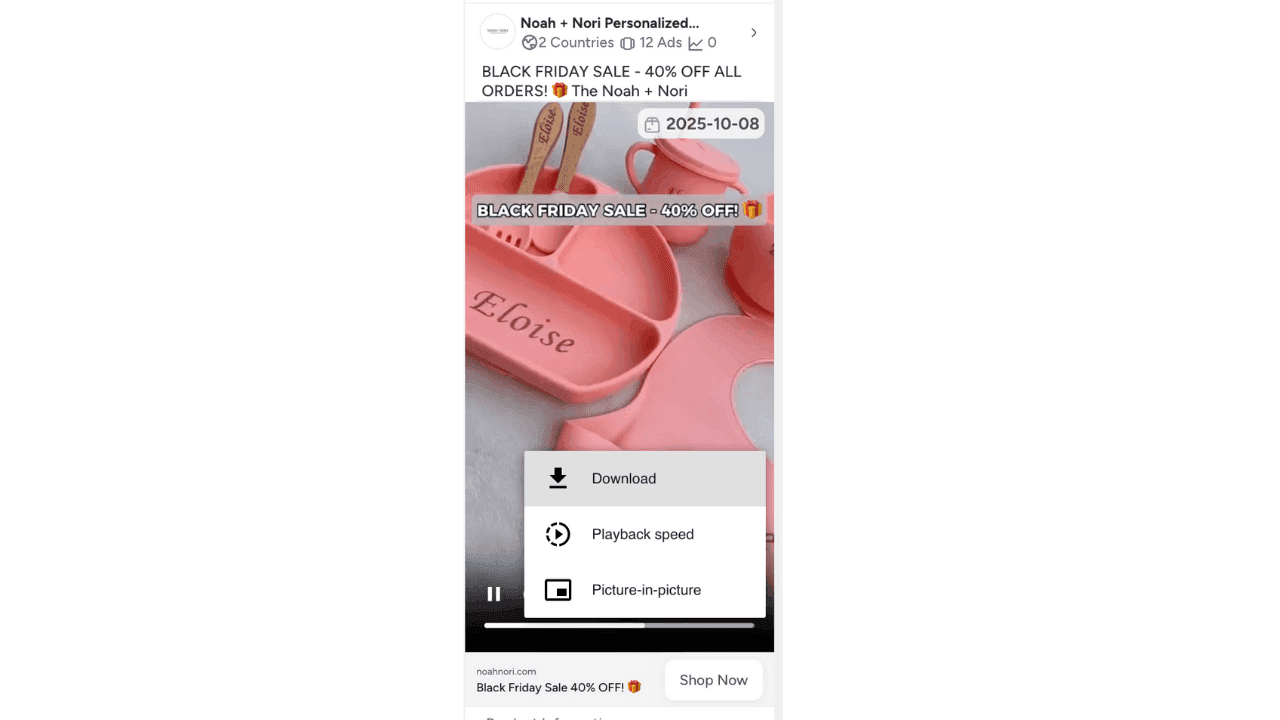
Continue saving additional videos and organize them into folders for later review and creative breakdowns.
This method removes the fragile steps that slow down most manual methods. There is no need to inspect page elements or hope that a third-party downloader still works. The process stays consistent, even during long research sessions.
Another advantage is scale. Saving one or two videos is easy with almost any method. Saving fifty ads from a competitive niche like beauty or fitness is not. WinningHunter supports that volume while keeping everything structured.
Method 2: Download Facebook Ad Library Videos Using “Show Video URL”
This method exists because Facebook sometimes exposes the video file directly through the browser. It is not guaranteed because it does not work every time. But if it works, it’s the quickest manual method.
Most people discover this by accident. You right-click a video expecting nothing, and suddenly, there is a Show video URL option. When that happens, you can grab the file without touching any tools or extensions. The downside is obvious. You cannot rely on it. Some ads allow it, many do not, and there is no pattern to predict which ones will.
Because of that, this approach makes sense only when you want a single video and do not care about research depth.
Here’s how to use the show video URL option:
Open the Facebook Ad Library and find the ad you want to save.
Play the video for a few seconds. It is important because the option usually appears only after the video loads.
Right-click directly on the video area. If you see the Show video URL, select it. If you do not see it, this method will not work for that ad.
Paste the copied link into a new browser tab and load the page.
Right-click the video again and choose Save video as to download the file.
There are no backups if it fails.
The biggest drawback is control. Imagine repeating the same process for 10 videos? Or 50?, definitely not efficient. Every video requires the same manual steps, which becomes tiring fast.
Method 3: Download Facebook Ad Library Videos Using Developer Tools
Buckle up for this one, because it ain’t for the faint-hearted. You only want to download the video for research purpose but this step requires full-blown developer knowledge.
This method is usually a last resort. You reach for it when the simple options disappear and the video refuses to expose a direct link. Facebook often embeds ad videos in a way that hides the source, which is why right-click options fail, and download buttons never show up.
If you are comfortable poking around inside your browser, this approach can still get the job done. If not, it quickly turns into frustrating work. That is why most marketers only use it when there is no other choice.
Here’s how to download Facebook Ad videos using developer tools:
Open the ad in the Facebook Ad Library and click See ad details so the full view loads.

Right-click anywhere on the page and select Inspect to open the browser developer panel.
Switch to the Network tab inside developer tools. This area shows every file the page loads.
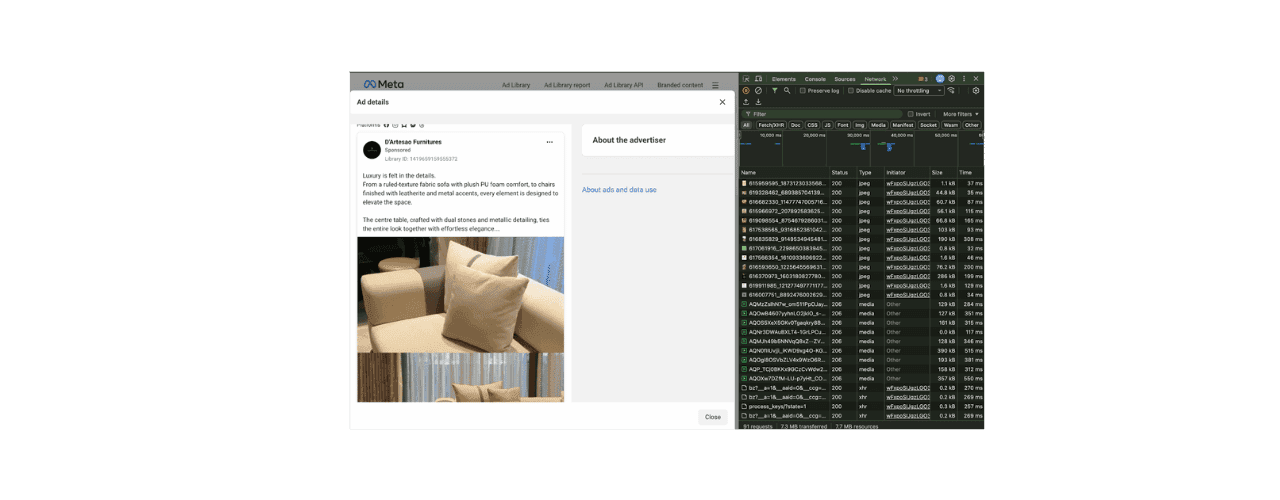
Play the ad video again from the beginning. This step forces the browser to request the video file.
In the Network list, filter the results by typing video or mp4 to narrow down the files.
Look for the largest file in the list, open it in a new tab, then right-click and save the video to your device.
This long process does work, but it is slow and easy to mess up. One missed click or wrong file can send you back to the start. For someone unfamiliar with developer tools, it feels more like trial and error than a repeatable method.
Saving a single video might be worth the effort, but doing this repeatedly across multiple ads quickly becomes exhausting. For structured competitor research or creative analysis at volume, this method creates more friction than value.
Method 4: Download Facebook Ad Library Videos Using Online Downloaders or Browser Extensions
This method is what most people try when they want something quick and do not want to think too much about how Facebook serves videos. It works often enough to stay popular, but not consistently enough to be trusted for serious research.
Most online downloaders and extensions do the same thing. They take a Facebook video link, try to extract the media file, and give you an MP4 if Facebook allows it. Sometimes it works perfectly. Sometimes nothing happens.
Steps to Download Using an Online Downloader or Extension:
Open the Facebook Ad Library and find the ad video you want to save.
Copy the ad link or video link from the page.
Open an online Facebook video downloader or activate a browser extension you already installed.
Paste the copied link into the downloader input field or let the extension scan the page.
Wait for the tool to generate a downloadable file.
Download the video if the option appears.
These tools depend entirely on Facebook not changing how videos are served. When Facebook updates something, many downloaders stop working overnight. Some limit video quality, others fail on ads that use newer formats, and many simply do not support ad library links at all.
Free tools often rely on tracking scripts or unnecessary permissions, which cause trust issues. Browser extensions in particular can request access far beyond video downloads, which is risky if you manage ad accounts or client assets.
Popular Chrome Extensions for Downloading Facebook Ad Videos
Is It Legal and Ethical to Download Facebook Ad Library Videos?
Most confusion comes from Facebook ad copyright. Just because you can view an ad does not mean you own it. Downloading a video to break down the hook or format is generally fine. Using it for internal research or team discussions also falls under acceptable Ad Library legal use.
The line gets crossed when people ask, can you reuse Facebook ads? You cannot. Republishing an ad or selling downloaded videos goes against Meta ad compliance rules and puts your account at risk. Even minor edits do not make someone else’s ad yours.
Ethical research is simple and important. Study what works, understand why it works, then create something original. That approach keeps you safe and actually makes you better at advertising.
Best Practices for Using Downloaded Facebook Ad Videos
Downloading Facebook ad videos is only useful if you turn those files into insight. Otherwise, they just pile up and never get opened again.
Keep your videos grouped in a way that makes sense to you. Some people sort by niche, others by hook or offer. The point is to make it easy to compare similar ads without thinking about where you saved them.
Do not judge ads one-by-one. Look at what keeps showing up across multiple winning creatives. Repeated patterns usually matter more than any single video.
Always check what sits around the video. The copy, the offer, and the landing page often explain why the ad works.
Treat these downloads as study material. You are trying to understand decisions and structure, not copy visuals or scripts.
Conclusion
Saving Facebook ad videos makes sense only when it helps you slow down and actually study what is working. The moment research turns into repeated scrolling and half-remembered ideas, downloads stop being useful.
Some methods in this guide are fine when you need one video and nothing more. Others exist mainly as backup options when Facebook hides the source. Over time, though, most marketers realize that jumping between tricks gets tiring and breaks focus.
That is why many people eventually move their research into a single place. WinningHunter removes the extra steps and lets you review ads, save videos, and keep context together. When research feels easier to manage, you spend less time figuring out how to save ads and more time understanding why they work.
FAQs
What is the fastest way to download Facebook ad videos?
The fastest option is using an ad research platform that includes built-in video downloads like WinngHunter. Instead of copying links or testing browser tricks, you can save videos while you are already reviewing ads. This approach keeps research smooth and avoids repeated steps that slow you down over time.
Are online Facebook video downloaders safe?
Some online downloaders function as expected, but safety varies widely. Many rely on tracking scripts or unnecessary permissions. Reliability is also an issue, as these tools often break when Facebook changes how videos load. They work best for occasional use, not consistent research.
Why doesn’t Facebook allow direct downloads?
Facebook limits direct downloads to protect advertiser content and reduce misuse. The Ad Library exists to provide transparency into active ads only. Restricting downloads helps prevent unauthorized reuse while still allowing public visibility.
Can I reuse Facebook ad videos in my own ads?
No. Facebook ad videos should only be used for research and learning. Reusing or reposting them can cause copyright issues and may lead to ad disapprovals or account penalties if reported by the original advertiser.


We already know what works before you even have the chance to blink!
© 2024 WinningHunter.com