how-to-see-if-a-facebook-page-is-running-ads
How to See If a Facebook Page Is Running Ads
By
Kinnari Ashar
A Page might look quiet, yet it could still be spending daily to test products or reach new audiences. When you know how to spot that activity, you gain access to information most people never check.
Seeing whether a Facebook Page is running ads gives you direct insight into your competitor’s business approach. You can study live creatives and understand what is being tested. This makes it easier to refine your own campaigns using real examples rather than assumptions.
But, where to look? Facebook offers transparency, but it’s not always efficient, especially when you need answers quickly or at scale.
Don’t worry! This guide will walk you through scalable methods first, followed by manual checks when needed.
Key Takeaways
WinningHunter lets you see live sponsored Facebook ads in one dashboard.
Facebook’s Ad Library is free but has major limitations.
Active ads indicate current spend, inactive ads show historical testing.
Facebook does not reveal targeting or exact spend.
Serious competitor research requires more than manual checks.
3 Ways to See If a Facebook Page Is Running Ads
Method 1 – How to See Sponsored Facebook Ads Using WinningHunter
If you want to see sponsored Facebook ads without going through pages, WinningHunter offers the most direct route. Instead of checking individual Facebook Pages or running repeated searches in the Ad Library, you can get access to live sponsored ads inside a single dashboard. Everything is organized and designed to save time when research needs to be done at large scale.
Here is how to do it:
Open your WinningHunter dashboard and go to the Facebook Ads section.
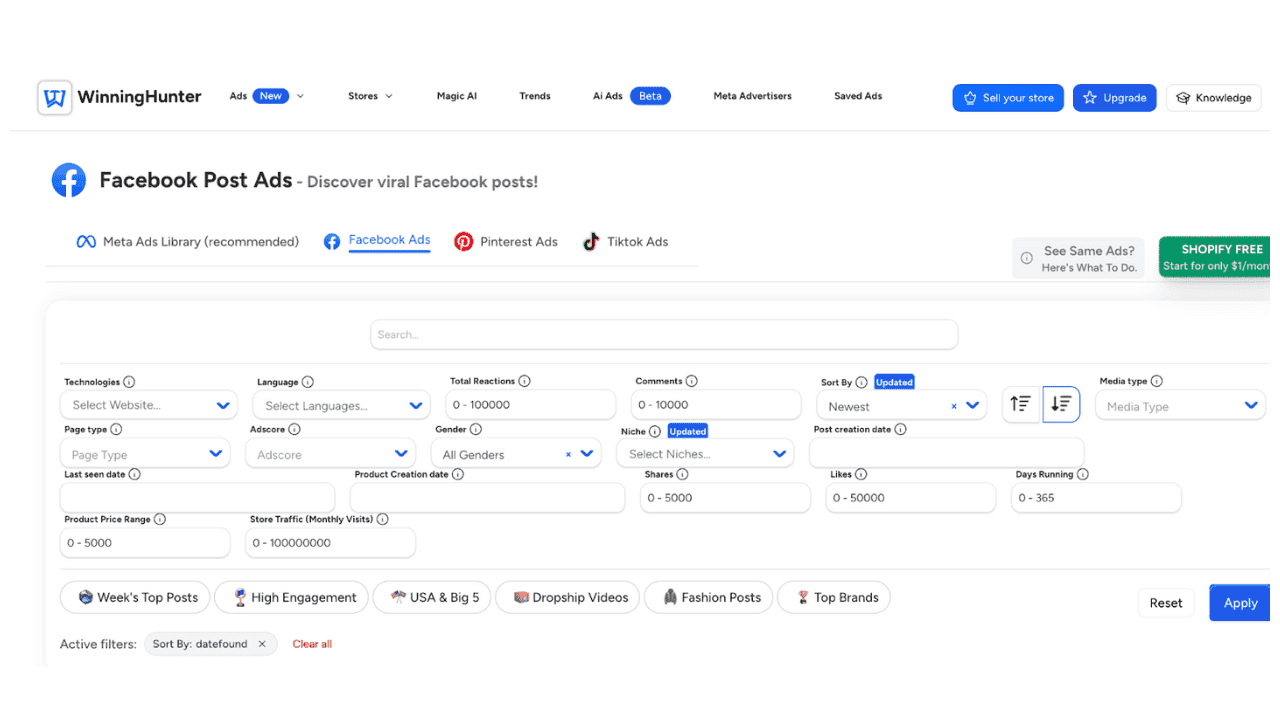
Type the Facebook Page name or brand name into the search bar. You can even search for product-related keywords.
Look at the results. If the Page is running ads, you will see its sponsored posts listed.
Sort the ads by creation date to check if the Page is actively launching campaigns.
Filter by how long the ads have been live. Ads that stay active for weeks usually indicate consistent performance.
Click any ad to see more details. Many ads are linked to Shopify stores with estimated sales and ad spend.
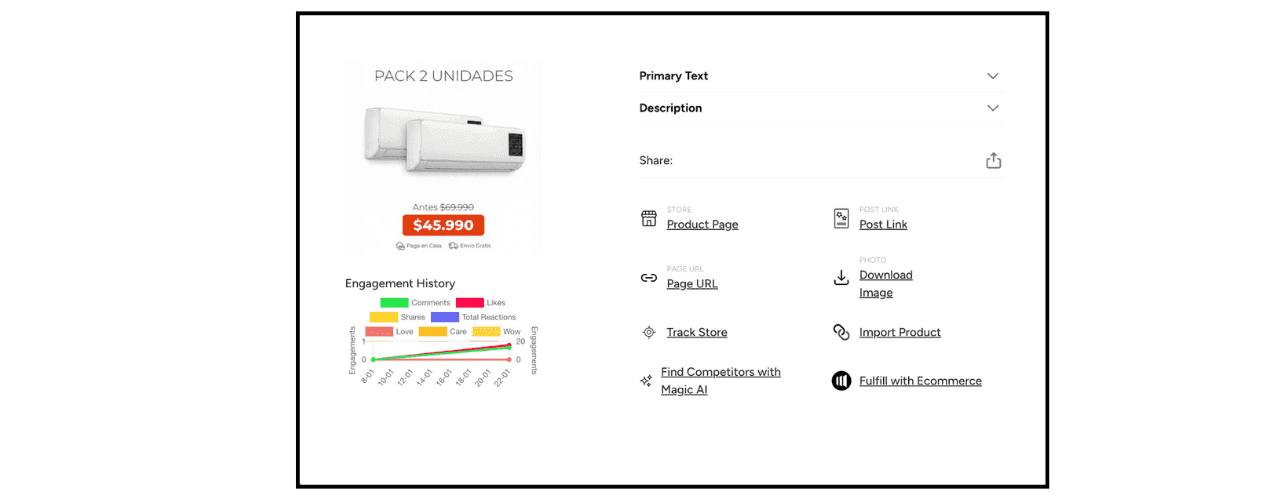
That is all you need to confirm whether a Facebook Page is running ads. You get a clear answer in seconds without manual checks or tiresome work. Winninghunter can get you access to 500k+ Facebook live ads every day, which is the best if you want to work with volume.
Method 2 – How to Use the Meta Ad Library to Check Facebook Ads
The Meta Ad Library is Facebook’s official ad transparency tool and is useful when you want to check ad activity for a specific Page without using third-party platforms. It works best for single Page checks rather than large-scale analysis.
It shows the creatives a Page is running, including videos and images. You can also see where the ads appear, such as Facebook or Instagram, along with start dates and whether an ad is active or inactive. In some cases, it displays limited impression ranges. This information helps confirm if a Page is advertising, but it does not explain performance or results.
Here is how to check if a Facebook Page is running ads using the Meta Ad Library:
Visit the Meta Ad Library website and log in to Facebook if prompted
Select All Ads from the category dropdown to view commercial ads.
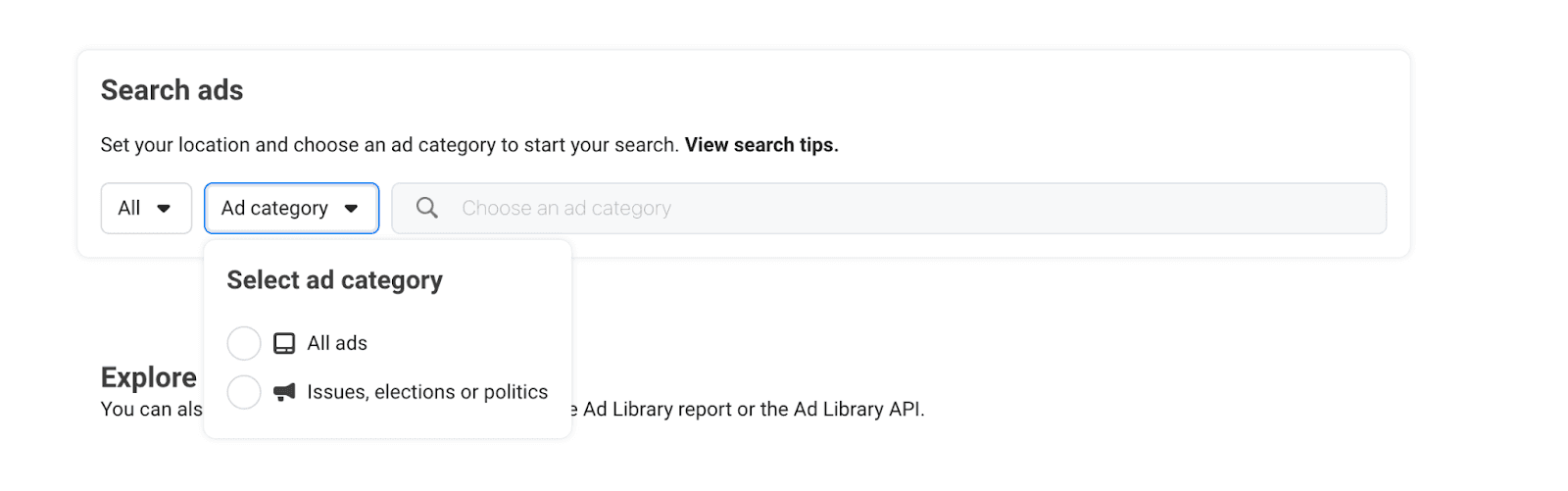
Choose the country you want to check.
Search using the Facebook Page name or Page URL.
Look for ads marked as Active to confirm current ad activity.
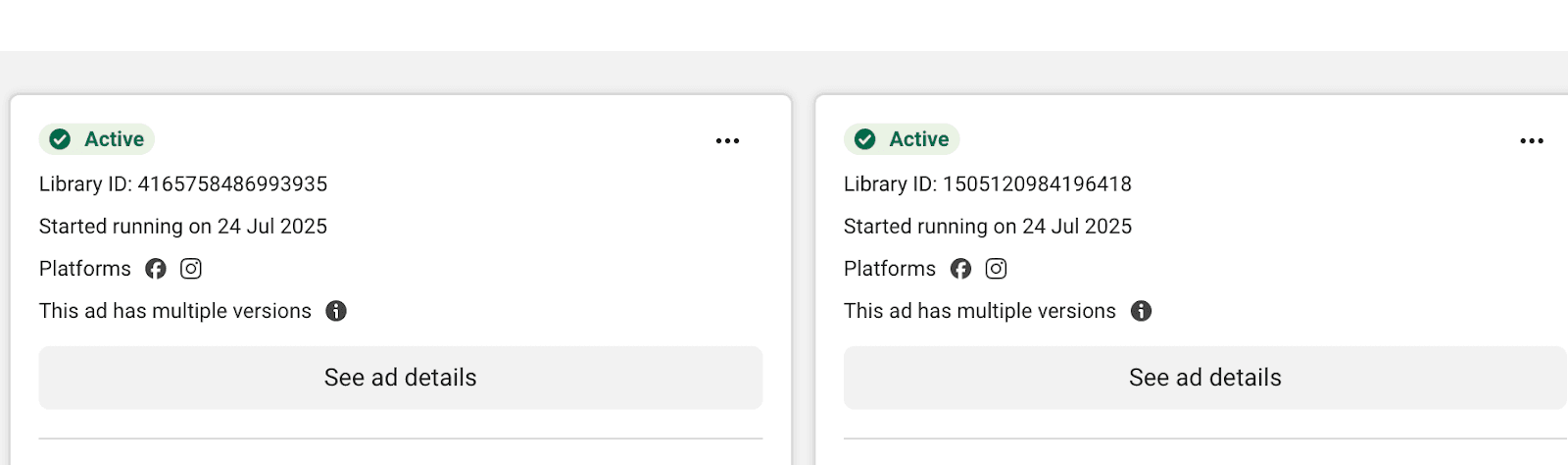
While the Meta Ad Library is reliable for transparency, it has certain limitations. You cannot see performance metrics or targeting details. Research is limited to one Page at a time, and there is no easy way to identify which ads are actually working.
Method 3 – How to Check Ads Directly From a Facebook Page
This method lets you check ad activity straight from a Facebook Page while you are already browsing. Every public Page includes a built-in transparency section that links directly to its ads. It is useful for quick checks but not designed for in-depth research.
To see if a Facebook Page is running ads using this method, follow these steps:
Open the Facebook Page you want to check.
Scroll down the Page until you find the Page Transparency section. But some users mentioned that they couldn’t find it the traditional way and found it when they clicked on the page name, so you can do it too in case you don’t find it in about section.
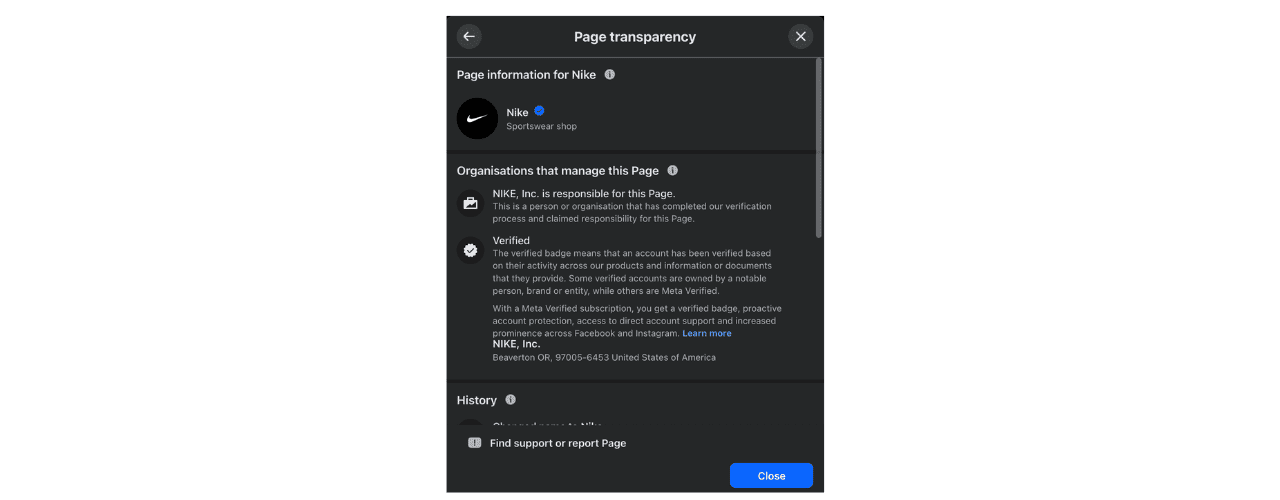
Click See All to expand the details or just scroll down.
Look for the section labeled Ads from this Page and select Go to Ad Library.
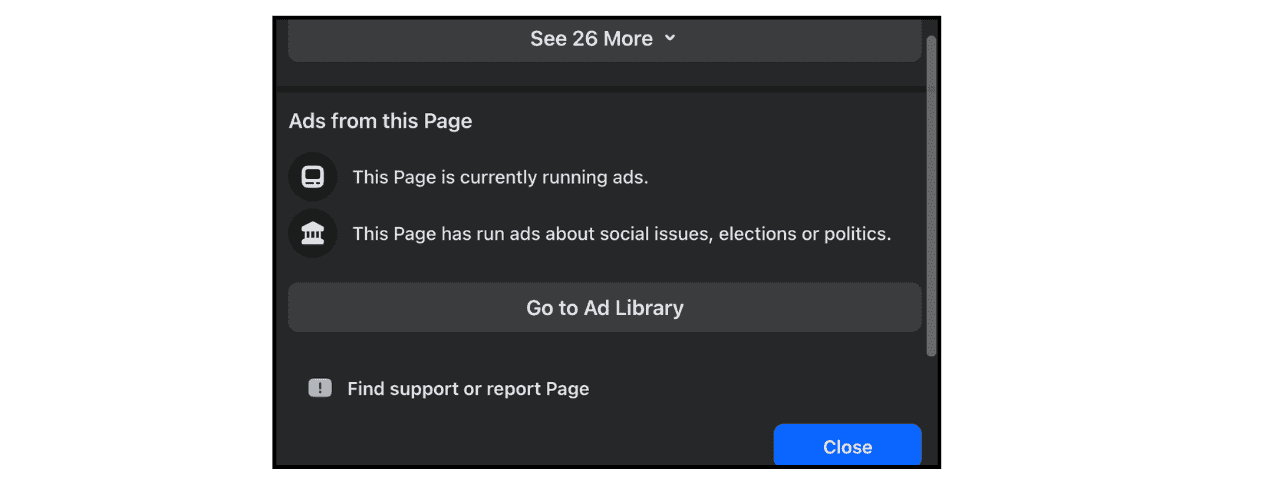
Review the ads shown and focus on those marked as Active to confirm current ad activity.
This method makes sense when you are already on a Page and want a quick answer. If something shows up in your feed and you are curious whether it is being promoted, this gets you there without extra steps.
However, it is not practical for large volumes. Each Page has to be checked manually again and again and again, sounds boring, right? Well, It is! There is no way to compare multiple brands side by side, and you do not get performance or profitability signals.
Here’s a quick comparison among the three to help you choose better:
Method | Best For | Speed | Scalability | Depth |
WinningHunter | Ongoing research | Fast | High | Deep |
Meta Ad Library | Single Page checks | Medium | Low | Limited |
Page Transparency | Quick browsing | Slow | Very low | Basic |
How to Tell If a Facebook Page Is Actively Running Ads?
It’s easy to assume that any visible ad is active, but that’s not the case with Facebook ads. Facebook does show ads that are no longer active, confusing viewers into thinking they’re still running.
Current status of ad matters more than how many ads you see. An active ad means that the brand/page is actively spending money on it right now, and that decision means something.
Why would a brand spend on ads if it’s not getting the desired result? Think about it.
They won’t! Ads that stay live usually exist because they serve a purpose, whether that is testing, scaling, or maintaining steady sales.
Inactive ads tell a different story. These are leftovers from earlier campaigns. They might show strong creative ideas or failed experiments, but they do not represent current investment. Facebook keeps them visible for transparency only.
If you want real insights, ignore volume and focus on labels. Active means money is moving today. Inactive means it already stopped.
Advanced Signals That a Facebook Page Is Spending Seriously
Once you know a Page is running ads, the next step is figuring out whether it is testing lightly or spending with intent. These signals help separate the two.
Ads live for 14 to 30 days or longer, often indicating stable performance or evergreen campaigns. Short-lived ads usually disappear quickly when results are weak.
The same creative appearing again after a pause often signals scaling or an audience reset. Advertisers rarely relaunch ads that did not perform well earlier.
Small variations in copy or visuals point to structured A/B testing. Changing one element at a time usually means the advertiser is optimizing.
Multiple formats running together, such as video, carousel, image ads, often suggest funnel-based advertising rather than a single test campaign.
Ads running on both Facebook and Instagram typically reflect budget confidence. Instagram placements cost more and are rarely added unless the advertiser expects returns.
These insights help you with your research, and you get the idea of how to spend your money wisely to get the best results. You don’t have to waste your money on testing when you can learn from your competitor.
What Facebook Shows vs What It Hides?
Facebook gives you just enough information to know that ads exist, but not enough to explain what is really happening behind them, or what is actually working.
Data You Can See
When you view ads through Facebook’s native tools, you get access to surface-level details that describe what is being shown, not how it performs. This includes:
The ad creatives themselves, such as videos, images, and written copy
The formats being used, including single image, video, or carousel
Where the ads are running, like Facebook or Instagram
The date an ad was launched
Different creative variations used within the same campaign
Data You Cannot See
What Facebook does not show is where the real decision-making happens. You will not see:
The audiences being targeted or excluded
The exact amount of money being spent
Whether the ads are driving sales or leads or nothing at all
Any indication of profitability or return
Information | Facebook Shows | Facebook Hides |
Ad creatives | Yes | No |
Ad formats | Yes | No |
Platforms used | Yes | No |
Ad launch date | Yes | No |
Audience targeting | No | Yes |
Exact ad spend | No | Yes |
Conversions and sales | No | Yes |
Profitability | No | Yes |
Finding Facebook Ads Is Only the Beginning
Checking whether a Facebook Page is running ads is easy once you know where to look. You can use Facebook’s own tools to confirm activity in a few clicks, and for quick checks, that is often enough.
The problem starts when confirmation turns into analysis. Native tools show ads in isolation. One Page at a time. No context. No way to tell which ads are being pushed seriously and which ones were short experiments.
That is where WinningHunter fits in. It does not just show you ads. It shows you patterns. You move from spotting individual creatives to understanding how brands are advertising across products and time.
So the difference is not about access. It is about usefulness. Manual tools answer the question, “Is this Page running ads?” WinningHunter answers the next one, which is the one that actually matters: “What can I do with this information?”
FAQs
Can I See the Actual Ads a Facebook Page Is Running?
Yes. You can see the creatives a Page is using, including images, videos and ad copy. What you cannot see is who those ads are targeting or how much money is being spent. Facebook shows what is visible on the surface, not the strategy behind it.
Do I Need a Facebook Account to Check Ads?
You do not always need a Facebook account to view ads. The Meta Ad Library can be accessed publicly in most cases without logging in. However, checking ads directly from a Facebook Page or using Page Transparency typically requires a Facebook account. A login is also required to manage ads, access ad preferences, or use Business Manager features.
Can I See Past Ads a Facebook Page Has Run?
Yes. Facebook keeps inactive ads visible even after campaigns end. These ads come from paused or completed campaigns and remain accessible for transparency. They are useful for understanding what a Page tested in the past, but they do not reflect current spending.
Is There a Way to Automate Facebook Ad Research?
Facebook does not offer any automation for ad research. Everything has to be checked manually, one Page at a time. Tools like WinningHunter are built specifically to solve this problem by collecting live ads, updating them continuously, and making large scale research possible without tiresome manual work.


We already know what works before you even have the chance to blink!
© 2024 WinningHunter.com