brandsearch-review
BrandSearch Review (2026): Legit Brand Intelligence Tool?
Too many tools. Not enough clarity.
If you run an e-commerce store, you already switch between platforms to track ads, check products, and estimate traffic. Each tool shows you something. None shows you everything in one connected view.
BrandSearch claims to bring those moving parts together. It positions itself as a system that tracks competitors, analyzes traffic, and surfaces product opportunities inside a single interface. That promise sounds efficient. It also raises a direct question. Is this genuine brand intelligence, or simply product research packaged differently?
We signed up and tested it ourselves to answer that.
In this review, you will see what we actually observed inside the dashboard and whether the starting price justifies what you get.
Quick Verdict
Score: 7.4/10 – It’s a well-designed hybrid intelligence tool with strong early traction, but still building public validation and data transparency.
What we measured
Area | Score |
Ad Spy Features | 7.5/10 |
Database Accuracy | 6/10 |
Update Frequency | 7/10 |
Pricing & Value | 7.5/10 |
Ease of Use | 9/10 |
Support Quality | 6.5/10 |
Best for:
Operators who want brand-level visibility, structured competitor tracking, and a clean interface without juggling multiple tools.
Skip if:
You require fully documented data modeling, heavily rely on third-party review validation, or need deep TikTok-first ad coverage.
What We Did to Test This
Before forming an opinion, this is what our WinningHunter team did:
Reviewed all publicly available feedback across Trustpilot, Reddit discussions, Chrome Web Store listings, and ecommerce forums
Analyzed all 18 Trustpilot reviews, which were 100% five-star at the time of writingInstalled and tested the BrandSearch Chrome extension to assess real workflow usability
Cross-checked traffic insights against publicly visible store signals wherever possible
Since BrandSearch still has a limited public footprint, we evaluated it cautiously.
What is BrandSearch?
BrandSearch presents itself as a brand intelligence and e-commerce research platform built around consolidation. It doesn’t limit you to ad creatives or product listings alone, it brings multiple research layers into one workspace.
When we tested it, we found the platform centers on these areas:
Competitor tracking
Traffic estimates
Product discovery
Ad insights
Market validation signals
The underlying pitch is simple. You should be able to view what a competing brand is selling, estimate how much traffic it attracts, and identify which products appear to gain momentum without jumping between separate tools.
This structure places BrandSearch in an interesting position. It does not operate purely as an ad-spy tool, nor does it focus solely on scraping storefronts. It attempts to function as a hybrid system where brand-level movement and product-level validation intersect.
What Real Users Say
Before forming our own conclusion, we studied external feedback across Trustpilot, Reddit threads, and Chrome extension comments. Here is what stood out.
What Users Love
1. Extremely high early satisfaction
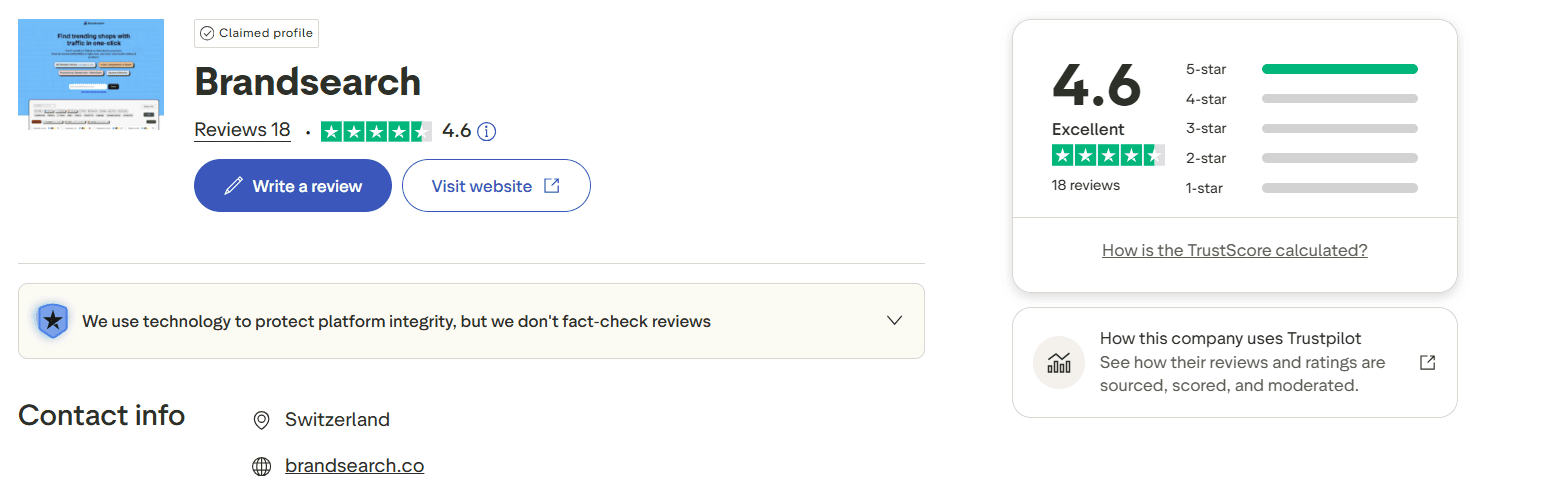
At the time of our review, BrandSearch holds a 4.6/5 TrustScore on Trustpilot based on 18 total reviews.
The breakdown is notable:
100% of published ratings are 5-star.
No ratings between one and four stars appear so far
That said, context matters. 18 reviews represent early-stage traction, not long-term validation. A perfect rating at low volume signals strong initial satisfaction, but it does not yet confirm how the tool performs across a larger and more diverse user base.
2. Chrome Extension Convenience
In addition to Trustpilot, we examined conversations on Reddit and user feedback on the Chrome Web Store.
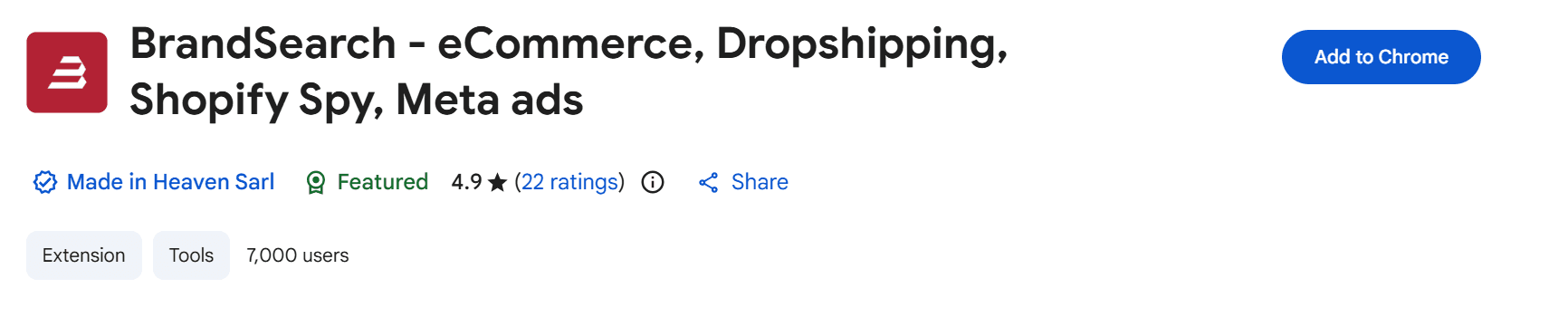
The Chrome extension currently holds a 4.9/5 rating from 22 users on the Chrome listing.
Most reviews focus on speed and practicality. Some called it perfect without but didn't write why.
Reddit threads also show direct exchanges between the developer and early adopters, which adds a layer of transparency.
A user questioned traffic reliability, and the developer responded publicly, clarifying that the tool uses Similarweb API data and invited users to share discrepancies for review.
The overall tone across platforms remains positive, particularly regarding the free access to the extension.
However, many discussions blur the distinction between the free extension and the full paid BrandSearch platform. When assessing depth and long-term value, separating those two experiences becomes important.
3. Clean and Intuitive Interface
User feedback repeatedly highlights the interface experience.
On Trustpilot, one reviewer described BrandSearch as the best spy tool in its field, specifically praising the UX and UI. The comment emphasized how the platform replaced a messy bookmark workflow and made competitor monitoring more structured and efficient.
Notably, we did not encounter complaints about a steep learning curve. For a tool that combines traffic, product, and competitor data, the presentation stays surprisingly accessible.
What Users Question
1. Traffic data reliability
On the Chrome Web Store, one user pointed out that traffic numbers did not always feel dependable and suggested cross-checking them with Similarweb instead of relying on them alone.
The developer replied publicly, stating that BrandSearch already pulls data through the Similarweb API and asked the reviewer to share specific examples of mismatched traffic or growth.
The takeaway is simple. Some users treat the traffic figures as estimates that require validation, and not as exact measurements. That distinction matters when you evaluate database accuracy.
2. Limited Public Validation
BrandSearch presents itself as an emerging brand intelligence platform, yet its independent footprint remains thin.
We could not find a substantial review based on G2. There are no detailed YouTube breakdowns from established ecommerce educators, no long-form Reddit case studies analyzing results, and no publicly available documentation explaining how its traffic modeling works.
One inconsistency stands out. On its own website, BrandSearch displays a graphic suggesting thousands of reviews and a strong rating on G2. A direct search on G2 did not surface a matching public profile with that volume.
When a platform highlights third-party validation, that validation should be easily traceable. If it is not, users are left with questions.
Limited criticism does not always signal quality. Sometimes it simply reflects limited reach.
3. Support Visibility
Public feedback reveals almost nothing about structured support experiences.
We did not find indexed discussions covering response times, refund handling, or in-depth technical troubleshooting. No detailed threads describe long waits or complex issue resolution. There are also no standout testimonials praising fast customer service.
What we did observe, however, was direct developer replies under Chrome Web Store reviews and a Reddit thread. That visible engagement signals responsiveness at a surface level.
Still, isolated replies under reviews are not the same as documented support workflows.
The overall silence remains neutral. It does not indicate problems, but it also does not yet demonstrate proven support reliability.
Features Breakdown: What You Actually Get
1. Brand Library
We tested Brand Library directly from the dashboard by applying different filters and running niche-based searches.
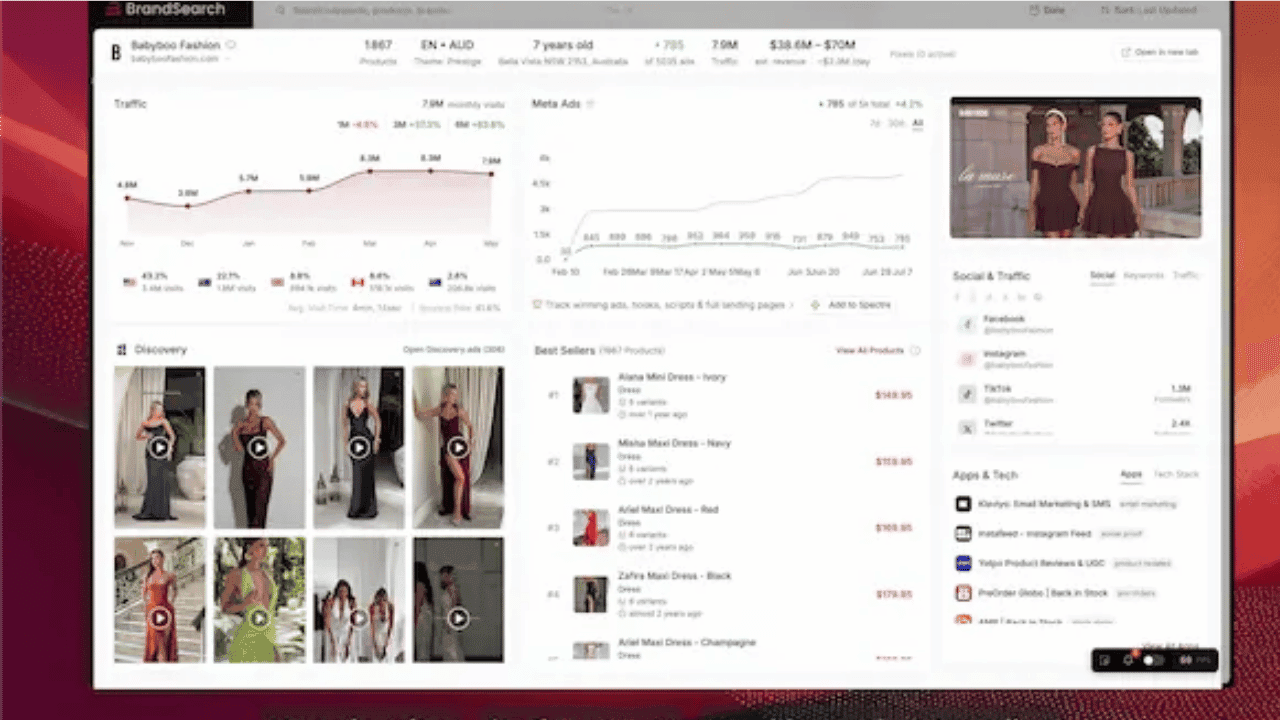
The interface opens with an AI search bar where you can enter brands, products, or niches. You get filter controls for traffic, ad count, ad spend, markets, and niches. You can also toggle trending and active stores only. This makes it possible to narrow results instead of scrolling through a raw list.
Each store appears as a card with visible signals attached. From there, you can click into a detailed view that connects product listings, estimated traffic, ad activity, and growth data. The layout keeps everything tied to the store itself rather than isolating products without context.
What stood out during testing was the filtering depth. You can sort by last updated, filter by ad presence, and segment by market. That gives you control over how broad or specific your research becomes.
2. Spectre
We tested Spectre by adding multiple competitor stores and observing how the tracking behaves over several update cycles.
After adding a brand, Spectre begins aggregating its publicly visible ads and linked landing pages into a dedicated tracking panel. New creatives populate automatically, which means you are not re-running the same searches to see what changed.
Each tracked store has its own organized view. You can review active ads, scroll through earlier creatives, and open associated landing pages directly from the same screen. A timeline format makes it easier to see when a campaign first appeared and whether it continues running.
The advantage here is not discovery. It is monitoring. If a competitor tests new hooks, rotates offers, or modifies funnels, those shifts appear inside your watchlist without manual effort.
For operators who follow specific brands closely, this structure keeps competitive movement visible without daily rechecking.
3. Discovery
We adjusted filters aggressively to see how flexible the dataset is. Sorting by ranking reordered the grid immediately. Switching to the newest shifted it again. Filtering by higher ad spend reduced the pool and surfaced brands running multiple creatives across regions. Toggling Active ads removed older campaigns from view.
Each card displays the brand name, number of active ads, target countries, and visible spend indicators. Clicking into a card opens more details, including additional creatives from the same advertiser. You can also export selected results.
What you do not get is an in-depth performance breakdown per ad. There is no granular CTR, CPA, or revenue attribution visible at the creative level. The ranking metric is present, but its calculation method is not explained inside the interface.
Discovery gives you a sortable, filter-driven ad database with visible spend signals and ranking indicators. It does not provide full performance transparency.
4. Swipe Files
Swipe Files functions as your internal saving and organization layer inside BrandSearch.
While exploring ads in Discovery and tracking competitors in Spectre, you can save creatives directly into boards and folders. Once inside Swipe Files, everything you have saved becomes searchable and filterable.
The layout separates content into tabs such as Ads, Brands, Landing pages, Mobile feed, and Tracked brands. This makes it possible to store more than just ad creatives. You can archive entire brand funnels or specific landing pages for later review.
Filters remain available inside this section. You can sort saved ads by format, funnel type, days active, ad spend, and ranking. Sorting by Last saved helps if you are building research sessions chronologically.
We tested creating multiple boards to separate niches. Moving saved ads between folders was straightforward. The structure resembles a private research vault rather than a public feed.
What you get here is organization. There are no additional performance metrics unlocked inside Swipe Files beyond what was visible when you saved the content.
5. Free Chrome Extension
The Chrome extension works differently from the main dashboard. It activates directly on Shopify store pages rather than inside BrandSearch.
We installed it and opened several live stores to see what appears. A side panel loads with traffic estimates, revenue projections, best-selling products, and visible ad activity. You do not need to copy a store URL into the platform. The data overlays instantly while you browse.
The panel also shows trending graphs and recent product additions. This makes quick validation easier when you are manually researching stores on Google or social platforms. Instead of switching tabs, you see basic signals immediately.
However, the extension does not provide the full filtering depth available inside Brand Library or Discovery. You cannot run complex queries or compare multiple stores side by side. It acts as a fast insight layer, and not a full research tool.
Pricing: What It Actually Costs
The pricing page presents three visible tiers: Starter, Outscaler, and Agency. The image above reflects the current monthly rates and includes limits. What changes are the usage limits and seat allocation.
The starting price positions BrandSearch closer to professional research platforms rather than entry-level tools. Plan selection mainly depends on how many competitors you intend to track and whether you need multiple seats.
The pricing page does not clearly outline refund terms or billing flexibility in detail. Perceived value will depend on usage frequency. Occasional users may find the cost high. Operators actively monitoring competitors may view it differently.
Who Should Use BrandSearch?
BrandSearch combines store intelligence, ad visibility, and tracking into one interface. Whether it fits your workflow depends less on features and more on how you operate.
Here is a simplified breakdown:
Suitable For
Scenario | Why It Fits |
You want competitor, traffic, and product signals in one view | Brand Library and Spectre reduce tool switching |
You prefer structured dashboards over heavy manual filtering | The interface keeps metrics visible without a complex setup |
You validate stores while browsing | The Chrome extension supports quick checks |
You are building or scaling brands | Ongoing competitor tracking supports strategic monitoring |
You can allocate around $63 per month | Entry-tier pricing assumes regular use |
Less Suitable For
Scenario | Why It May Not Fit |
You require a fully transparent, large-scale ad database methodology | Ranking logic and traffic modeling are not deeply documented |
You focus primarily on TikTok ads | The platform is not positioned as TikTok-specific |
You rely heavily on public social proof | Review volume is still relatively limited |
You are testing on a tight beginner budget | Entry pricing sits above many starter tools |
What We’d Change
BrandSearch covers a wide range of research functions inside one system. The structure is solid. The interface is clean. The workflow makes sense.
Where it can improve is transparency and external validation. If we were advising the BrandSearch team, here is what we would recommend:
Publish clearer data methodology: Explain how traffic estimates, ranking scores, and trend indicators are calculated. Users working with spending decisions want to understand the logic behind the numbers, not just see them.
Clarify refresh cycles - State how frequently ads, traffic estimates, and rankings update. Is the data refreshed daily, weekly, or on another schedule? Clear expectations reduce doubt.
Strengthen third-party presence: Build a verified and easily traceable profile on platforms such as G2. Independent reviews carry more weight than self-displayed ratings.
Publish detailed case studies: Show how real merchants used BrandSearch in decision-making. Screenshots, timelines, and measurable outcomes would add practical credibility.
Support: What to Expect
Public reviews do not provide much insight into support quality. There are no visible complaint threads describing unresolved tickets. There are also no detailed breakdowns of complex issues being handled. The volume of feedback is simply too small to establish a pattern.
Inside the dashboard, a chat-based support system is clearly visible. Users can open a live chat window at any hour. A bot responds immediately and can route conversations toward the support team.
The human team operates within set hours. When the team is offline, the interface displays the next availability window and informs users that a reply will follow once the team returns. The screenshot above shows this clearly.
So access to chat is constant, but real-time assistance depends on team hours.
Our stance here remains neutral for now.
The Bottom Line
BrandSearch scored 7.4/10 in our analysis.
It combines store intelligence, ad tracking, and competitor monitoring inside one structured system. The interface is clean. Navigation is straightforward. Early user sentiment is strongly positive. The Chrome extension adds speed to everyday research.
The platform is still building its public footprint.
Trustpilot ratings look strong, though the review base remains small. Traffic estimates function better as directional indicators than precise measurements. Public documentation around ranking logic and data modeling remains limited.
Our Recommendation: If you want brand-level visibility and competitor intelligence inside a single workflow, BrandSearch is worth exploring.
If your decisions rely on large-scale third-party validation or fully documented modeling transparency, you may prefer platforms with longer-established public records.
FAQs
Is BrandSearch worth it?
If you routinely study competitors, track ad angles, and validate stores before testing products, the platform can justify its monthly cost. The value increases with frequency of use. If you only research occasionally or test ideas casually, the entry price may feel high relative to usage.
Is BrandSearch legit?
Yes. The platform is live, functional, and publicly accessible. It has verified user reviews, an active Chrome extension with ratings, and working dashboard features across brand tracking and ad discovery. The question is less about legitimacy and more about whether it fits your workflow.
Does BrandSearch have a free trial?
Trial availability can change, so it is best to check the official pricing page for the most current offer. Some plans show discounted monthly rates, and promotions may rotate. Always confirm directly before subscribing to avoid relying on outdated information.
What is the best BrandSearch alternative?
That depends on what you prioritize. If your main focus is ad-level research at scale, tools like Winning Hunter may feel more specialized. If you prefer combining store data, traffic signals, and tracking inside one interface, BrandSearch leans that way.
Can I cancel BrandSearch anytime?
The pricing page outlines monthly subscription tiers. They do allow cancellation before the next billing cycle to avoid renewal charges. But you should always review the current billing terms directly to confirm refund policies and cancellation timing before subscribing.


We already know what works before you even have the chance to blink!
© 2024 WinningHunter.com