best-meta-ads-tools
20+ Best Meta Ads Tools in 2026 (Tested & Compared)
By
Kinnari Ashar
Running Meta ads in 2026 feels expensive before you even open Ads Manager.
In competitive ecommerce categories, CPMs typically range from $12 to $18. Advantage Plus campaigns now absorb most of the budget, pushing more decisions into automated systems. You get scale, but you also lose visibility. Spending flows quickly. Control feels thinner.
If you manage a few accounts, run ads for your own store, or scale past $3000 to $5000 a month, you have likely seen it. Creatives burn out within weeks. Reported ROAS looks healthy inside Meta, yet Shopify or GA4 tells a different story. Attribution continues to shift as the window changes and Conversions API adoption reshapes reporting.
Meanwhile, Meta keeps evolving. The Advantage Plus ecosystem has matured. The February 2026 update brought Manus AI directly into Ads Manager, tightening automation even further.
So which tools actually help you stay in control?
We tested 20+ Meta ad tools across 7 practical categories. Here is what deserves your budget.
Quick Picks - Our Top 5 Meta Ads Tools for 2026
# | Tool | Best For | One Differentiator | Starting Price |
1 | WinningHunter | E-commerce scaling | Shopify revenue signals + live ad tracking | ~€49/mo |
2 | Dropship.io | Product discovery | Trending product detection + store intelligence | ~$39/mo |
3 | PPSPY | Competitor tracking | Shopify store revenue + product launch alerts | ~$29/mo |
4 | AdSpy | Deep ad archive research | Large searchable Meta ad database | ~$149/mo |
5 | ShopHunter | Revenue validation | Store-level revenue tracking | ~$49/mo |
1. WinningHunter
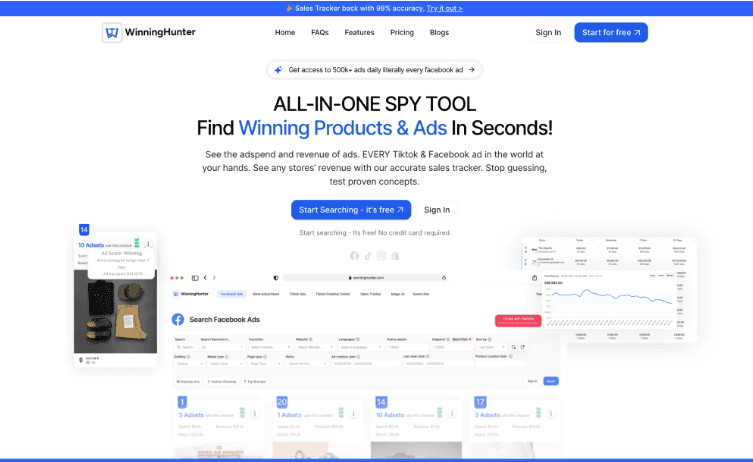
If you run Meta ads for a Shopify store, you need more than a swipe file of random creatives. You need to see which products are generating real momentum and which ads have survived long enough to signal profitability. WinningHunter focuses on that layer.
The platform combines Meta ad monitoring with Shopify store intelligence. You can review estimated store revenue trends, track product-level performance signals, and move directly from an ad to the live product page. This makes it easier to understand pricing strategy, offer structure, upsells, and funnel depth before you commit budget.
Filtering is practical. You can sort ads by niche, engagement type, call to action, funnel structure, and brand category. Product level tracking also shows how long a specific ad has been active, which helps you separate short tests from sustained scaling.
Pricing starts at approximately €49 per month. There is a free trial as well.
Key Features
Shopify revenue intelligence overlay highlighting store-level sales direction and product momentum
Meta ad database with deep filters across engagement, niche, funnel type, and format
Direct store link tracking for landing page and upsell flow analysis
Product-specific ad discovery with ad longevity visibility
Advanced filtering built for dropshipping and scaling stage ecommerce brands
Pros
Strong Shopify ecosystem focus compared to broader ad spy databases
Clear interface designed for fast competitor research and breakdown
Helpful for spotting products that appear to be scaling, not just testing
Cons
Primarily built for e-commerce brands, limited utility for lead generation campaigns
2. Dropship.io
Dropship.io approaches the problem from the product angle. You see which Shopify stores are gaining traction, which products are appearing across multiple shops, and how revenue trends shift over time. That context helps you judge whether demand looks sustained or speculative.
The platform also connects products to active Meta ads. When you find a trending item, you can check whether paid traffic supports its growth. Engagement patterns offer additional clues about whether a store is quietly testing or committing real budget to scale.
Plans typically start around $39 per month, with trial access often available.
Key Features
Detection of trending products across Shopify stores
Revenue estimation with visible growth direction
Monitoring of competitor product launches
Meta ad references linked to specific products
Insights into engagement and scaling patterns
Pros
Supports product validation before heavy ad investment
Combines store tracking with ad visibility in one workflow
Suitable for lean testing models with controlled risk
Cons
Revenue figures are directional estimates
Does not include campaign automation capabilities
Mainly relevant for Shopify-focused sellers
3. PPSPY
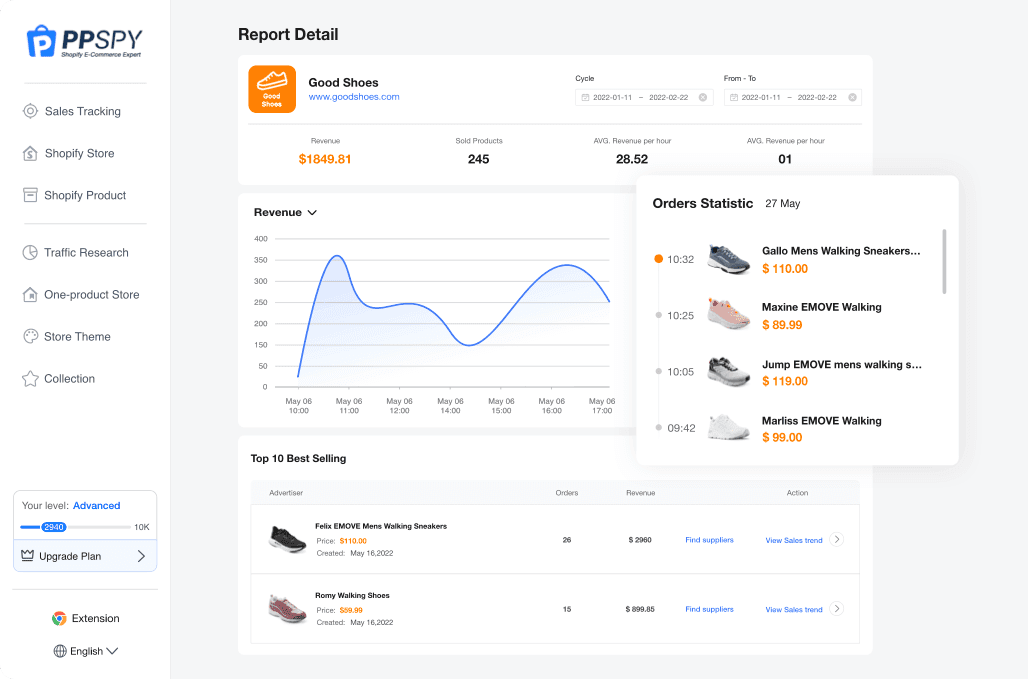
PPSPY gives you visibility into how Shopify brands evolve. You can review estimated revenue movement, study how product catalogs expand or contract, and detect when a competitor introduces something new. That timeline matters. A single viral product tells you very little. Consistent catalog growth tells you far more.
The platform connects store activity with visible Meta ads, allowing you to see whether new launches align with paid traffic pushes. Traffic trend data adds context, helping you judge whether momentum appears steady or temporary. When you notice coordinated product drops and ad activity, you gain a clearer signal about strategic scaling.
Plans generally start at $39/month. A free trial is typically available.
Key Features
Shopify store revenue estimates with historical tracking
Archive view of past and current product listings
Alerts for newly added products
Direct links to related Meta ad activity
Traffic trend visibility for performance context
Pros
Deep store-level competitive transparency
Useful for identifying when competitors prepare to scale
Helps you time your own campaign launches more strategically
Cons
Revenue figures are projections based on modeling
Limited tools for organizing or categorizing ad creatives
Designed primarily for e-commerce businesses
4. AdSpy
If your research starts with creatives rather than products, AdSpy gives you sheer volume to work with.
The platform operates as a large-scale searchable archive of Meta and Instagram ads. You can research through campaigns across multiple industries, study how messaging evolves, and uncover angles that have resurfaced over time.
Search controls allow filtering by keyword, call to action, engagement signals, niche, and country. Historical tracking adds context by showing whether a creative ran briefly or stayed active for an extended period.
Pricing is flat $149 per month with no permanent free plan.
Key Features
Extensive searchable Meta and Instagram ad archive
Filtering by keyword, call to action, engagement, niche, and country
Historical ad visibility to assess longevity
Landing page preview access
Broad cross-industry coverage
Pros
Large creative database spanning multiple niches
Advanced filtering for detailed research
Useful for studying messaging patterns across markets
Cons
No revenue or store-level intelligence
Interface feels dated compared to newer platforms
Not designed specifically for Shopify sellers
5. ShopHunter
Before you increase budgets, you want confirmation that a store is growing for real and not just generating noise. ShopHunter approaches the Meta strategy from a revenue validation angle.
The platform tracks estimated Shopify store revenue over time, allowing you to observe upward or downward movement across weeks and months. That historical perspective helps you separate stable growth from temporary spikes. You can also monitor individual product performance patterns to see which items appear to drive store expansion.
Comparison tools allow side-by-side evaluation of competing stores, giving you a clearer benchmark for scale. Meta ad visibility references add supporting context without overwhelming the dashboard.
Pricing typically begins around $50 per month. Free trial access may vary.
Key Features
Store revenue estimation tracking across time
Product-level performance monitoring
Historical revenue growth analysis
Competitor store comparison tools
Indicators of scaling momentum
Pros
Provides revenue context before increasing ad budgets
Useful for benchmarking competitors within your niche
Encourages more data-driven scaling decisions
Cons
Does not assist with creative testing or generation
Revenue figures are modeled estimates
Limited to Shopify-focused businesses
Complete Comparison Table of Meta Ads Tools in 2026
Tool Name | Category | Best For | Key 2026 Focus | Integrations | Starting Price | Free Trial |
Meta Ads Manager | Native | All advertisers | Advantage+ + Manus AI | Meta Pixel, CAPI, GA4 | Free | Free |
Facebook Ad Library | Native / Spy | Free competitor research | Real-time ad transparency | Public metadata | Free | Free |
WinningHunter | Product & Ad Intelligence | Shopify scaling brands | Product-level revenue estimation | Shopify signals | €49/month | Yes |
Madgicx | Campaign Automation | Scaling brands | AI budget allocation | Meta Ads | $99/month | Yes |
AdEspresso | Campaign Management | SMBs & agencies | Structured split testing | Meta Ads | $49/month | Yes |
WASK | SMB Automation | In-house teams | Budget alerts + light automation | Meta, Google Ads | $25/month | Yes |
Revealbot | Rules Automation | Agencies | CPA & ROAS rule engine | Meta, Google Ads, Slack | $45/month | Yes |
Smartly.io | Enterprise Automation | Global brands | Cross-platform orchestration | Meta, TikTok, Shopify | Contact Sales | No |
AdAmigo.ai | AI Optimization Assistant | Solo media buyers | AI performance summaries | Meta Ads API | $99/month | No |
Canva Pro | Creative Production | Lean teams | Fast multi-placement design | Meta export formats | $14.99/month | Yes |
AdCreative.ai | AI Creative Generation | High-volume testing | Bulk ad variation generation | Meta Ads | $25/month | Yes |
Creatify | AI Video Generation | E-commerce brands | UGC-style video automation | Meta, TikTok | $19/month | Yes |
Motion | Creative Analytics | Scaling DTC | Creative fatigue tracking | Meta, TikTok | $19/month | Yes |
Bestever | Creative Intelligence | High-volume teams | AI creative pattern tagging | Meta Ads API | $39/month | Yes |
ShopHunter | Store Validation | E-commerce advertisers | Revenue trend tracking | Shopify | $49/month | Yes |
PPSPY | Competitor Store Tracking | Dropshippers | Historical store monitoring | Shopify signals | $39/month | Yes |
AdSpy | Ad Database | Niche researchers | Large Meta ad archive | Meta scraping database | $149/month | No |
Dropship.io | Product Research | Dropshippers | Trending product detection | Shopify signals | $39/month | Yes |
BigSpy | Cross-Platform Ad Database | Multi-channel researchers | Multi-network ad archive | Ad scraping database | $19/month | Yes |
Triple Whale | Attribution | E-commerce brands | Blended ROAS dashboard | Shopify, Meta | $149/month | Yes |
AgencyAnalytics | Reporting | Agencies | White-label dashboards | Meta, GA4 | $59/month | Yes |
Hyros | Advanced Attribution | High-spend advertisers | Multi-touch attribution | Meta, Shopify | $230/month | No |
How We Evaluated These Tools?
This guide is not a recycled roundup or a list built from press releases. Where possible, we worked directly inside active Meta ad accounts to see how these tools behave under real budget pressure.
Automation platforms, creative analytics software, and attribution tools were tested in live environments. We paid attention to setup friction, workflow clarity, reporting logic, and how each system handled scaling campaigns.
For enterprise platforms and higher-tier tools where full access was not practical, we relied on product demos, technical documentation, and conversations with experienced agency operators and in-house media buyers.
Every tool was assessed using a structured BOSS-style framework. We evaluated creative automation capabilities, attribution accuracy, API and integration depth, pricing transparency and scalability, ease of use, reporting clarity, AI-driven optimization quality, and support and community strength.
We also reviewed user feedback on Trustpilot, G2, and Capterra, monitored discussions in Reddit communities such as r/PPC and r/FacebookAds, and cross-checked insights with working media buyers.
Category 1: Meta’s Native Tools - The Foundation Everyone Starts With
Before paying for additional software, you need to understand what Meta already gives you. Many advertisers rush toward third-party tools without fully using the systems built directly into their ad accounts.
These native tools form the operational base of every campaign. Whether you rely on automation, analytics platforms, or reporting dashboards, execution still starts here.
We begin with the tools that every advertiser already has access to, because nothing else functions without them.
1. Meta Ads Manager
If you run ads on Facebook or Instagram, this is where you work. Ads Manager is the system that controls your campaigns, ad sets, budgets, audiences, and creatives.
Over the past few years, Meta has pushed more automation into this interface. Advantage Plus campaigns handle much of the targeting and budget distribution. Dynamic Creative allows the platform to test variations automatically. Manus AI now appears inside the dashboard to suggest adjustments and surface performance insights.
Most advertisers underestimate how much power already exists here. Before adding automation software or reporting tools, you need to understand how campaign structure, attribution settings, and conversion tracking function natively.
Every third-party platform connects back to this system. If you do not understand Ads Manager, no external tool will fix that.
Best For: Every Meta advertiser.
2. Advantage Plus and Meta Automation
Meta has moved most campaign optimization toward automation. Advantage Plus is part of that shift.
With Advantage Plus Sales Campaigns, you no longer build complex audience layers with multiple ad sets. You launch broader campaigns and let Meta distribute budget based on conversion data. This works best when your store already generates consistent sales. If tracking is weak, results suffer.
Advantage Plus Audience also changes targeting. Instead of locking delivery to strict interests or lookalike lists, you guide Meta and allow it to expand reach based on real behavior.
Dynamic Creative mixes different headlines and images automatically to find combinations that convert better. Opportunity Score highlights areas that may need improvement. Value Rules let you assign a higher value to certain customer groups. Manus AI now provides in-platform suggestions to help you review performance faster.
All of this relies on accurate tracking through the Pixel and Conversions API.
We break these features down further later in this guide.
Category 2 - All-in-One Campaign & Scaling Platforms
Scaling inside Ads Manager alone can quickly become difficult. Budgets shift, creatives fatigue, and reporting takes time.
All-in-one platforms connect to Meta and help manage automation, budget control, and performance visibility from one place. Most combine budget rules, creative tracking, audience scaling, and multi account access in a single system.
They suit growing DTC brands, in-house teams, and agencies managing multiple accounts. Meta runs the campaigns. These tools help you scale them with more structure.
1. WinningHunter
Within the context of campaign and scaling platforms, WinningHunter plays a different role. It does not automate budgets or restructure ad sets. It strengthens the decision you make before you scale.
When you prepare to increase spending, uncertainty usually comes from product confidence. This is where WinningHunter fits. Instead of adjusting bids or rules, it helps you verify whether a product shows real traction across Shopify stores and active Meta ads.
You can review estimated revenue direction, monitor competitor product movement, and identify ads that have been running long enough to suggest stable performance. That insight reduces guesswork before you push campaigns harder inside Meta.
It integrates with Shopify signals and Meta ad data, and the Chrome extension speeds up research directly from live stores.
If your scaling decisions depend on product proof first and automation second, this platform complements your Meta workflow rather than replacing it.
2. Madgicx
As ad spend increases, manual budget shifting becomes harder to manage consistently. Madgicx is built for that stage. It connects directly to your Meta account and introduces automated budget distribution and rule-based adjustments designed to stabilize scaling.
The platform reallocates spend across campaigns and ad sets based on performance thresholds such as CPA or return targets. Instead of checking performance daily and moving budgets by hand, you define guardrails and let the system react. Audience clustering also helps surface which segments contribute most to conversions, giving you clearer scaling signals.
Creative performance tracking adds another layer. The system highlights fatigue patterns and identifies which ads deserve more budget. Agencies benefit from cross-account dashboards that consolidate reporting and optimization logic into one place.
Key Features
AI-based budget allocation across campaigns and ad sets
Automated bid adjustments using CPA or ROAS rules
Audience performance clustering
Creative fatigue and performance analysis
Cross-account dashboards for agencies
Optimization prompts based on historical data
Pros
Reduces manual budget reallocation workload
Useful during structured scaling phases
Combines automation with clear performance reporting
Cons
Performs best with stable conversion volume
May require onboarding time for new advertisers
Does not replace dedicated attribution platforms
Pricing is $99/month. A free trial is typically available.
3. AdEspresso by Hootsuite
Testing fails more often because of a messy setup than bad ideas. When campaigns multiply quickly, structure gets sloppy. AdEspresso was designed to bring order to that process.
The platform guides you through campaign creation in a controlled sequence. Objectives, audiences, creative variations, and budgets are arranged in a clear flow so experiments remain clean. Its built in split testing system allows you to compare variables without rebuilding campaigns manually inside Meta.
Reports are presentation-ready. Visual summaries make it easier to explain performance to clients or internal teams who do not need granular breakdowns. Agencies benefit from multi account access that keeps client work organized. For advertisers moving beyond simple post boosting, the platform provides a more disciplined way to run structured ads.
Key Features
Guided campaign creation workflow
Structured split testing builder
Visual performance reports
Multi-account management
Boosted post optimization tools
Pros
Easier onboarding than the native Ads Manager alone
Clear reporting suitable for stakeholder reviews
Helpful transition tool from basic boosting to structured testing
Cons
Limited automation depth for aggressive scaling
Less suitable for high spend performance teams
Attribution features remain basic
Pricing begins around$49/month. A free trial is generally available.
4. WASK
For small teams handling ads internally, time is usually tighter than budget. WASK focuses on keeping campaign management simple without requiring a deep technical setup.
It connects to both Meta and Google Ads accounts and surfaces performance issues quickly. If a campaign or ad set drops below defined thresholds, automated rules can pause it before spend drifts further. Budget alerts highlight overspending patterns, while performance summaries bring audience and creative data into one dashboard.
Its automation layer is light but practical. You receive AI-driven suggestions for campaign adjustments, though control remains straightforward. That balance suits business owners who want guidance without handing full authority to complex rule engines.
Key Features
AI-driven campaign improvement suggestions
Automated rules to pause underperforming ads
Cross-platform performance dashboard
Audience and creative performance insights
Budget optimization alerts
Pros
Accessible pricing for small businesses
Simple automation without technical overload
Well-suited for low to mid-level ad spend
Cons
Limited sophistication for large-scale brands
Automation depth is lighter than that of advanced platforms
Not designed for enterprise environments
Pricing starts around $25/month, with a free trial available.
Choose WASK when you manage campaigns yourself and want basic automation support at a manageable monthly cost.
Category 3: Automation & Rules Engines
As budgets grow, manual optimization becomes harder to manage consistently. This category covers tools built for tighter campaign control than native Advantage Plus alone provides.
While Meta optimizes delivery within campaigns, these platforms automate the decision layer around them. They are best suited for agencies, high spend brands, and performance teams that need structured control across multiple accounts.
1. Revealbot (birch)
Control is the selling point here.
Revealbot gives you the ability to define exactly how campaigns react to performance changes. You can create rules tied to CPA, ROAS, CTR, spend, or frequency. When a condition is met, the system takes action automatically, whether that means pausing an ad, increasing budget, or adjusting bids.
Scaling rules are particularly useful for agencies. If a campaign hits a defined return target, budget increases can trigger without manual intervention. Slack notifications add another layer by alerting teams when thresholds are crossed.
Multi-account access and cross-platform support across Meta and Google Ads make it practical for performance-focused teams managing multiple clients.
Key Features
Custom automation rules based on CPA, ROAS, CTR, spend, and frequency
Automatic scaling rules tied to performance thresholds
Slack alerts for campaign triggers
Multi-account management dashboard
Cross-platform support for Meta and Google Ads
Bulk ad creation workflows
Pros
Highly granular automation control
Reduces repetitive manual monitoring
Well-suited for agency environments
Cons
Requires technical understanding to configure correctly
Steeper learning curve for beginners
Does not include built-in attribution modeling
Pricing starts at $45/month. A free trial is generally available.
2. Smartly.io
Smartly.io supports multi-market advertising with centralized control over budgets, creatives, and approvals. Teams can produce large volumes of creative variations and automatically personalize them by audience segment. This becomes critical when operating across regions, languages, and product catalogs.
Budget pacing tools help maintain spend targets across markets, while orchestration features coordinate campaigns across Meta, TikTok, Pinterest, and Snap. Enterprise workflow controls allow structured approvals, collaboration between teams, and controlled publishing processes.
Key Features
AI-powered campaign orchestration across markets
Dynamic creative automation at scale
Audience-based creative personalization
Budget pacing and allocation tools
Cross-platform advertising management
Enterprise workflow and approval systems
Pros
Built for high-volume creative production
Effective for global multi-market operations
Automation depth exceeds native Ads Manager capabilities
Cons
High cost compared to mid-market tools
Excess capacity for smaller advertisers
Requires structured onboarding and account management
Pricing is enterprise-level and available through direct sales consultation. There is no public free trial.
Choose Smartly.io when managing large budgets across regions that demand a dedicated automation infrastructure.
3. AdAmigo.ai
Reading campaign data is one thing. Interpreting it quickly is another. AdAmigo.ai adds a conversational layer on top of your Meta account to help with that gap.
The platform connects through the Meta Ads API and generates plain language summaries of campaign performance. You can ask direct questions about results and receive structured insights rather than going through multiple breakdown views. It also suggests budget reallocations and highlights audience segments that drive stronger outcomes.
This is not a rules engine that executes changes automatically. It works more like a decision assistant. Optimization suggestions are based on historical performance patterns, but implementation remains in your hands. For solo media buyers or small teams, that balance keeps control while reducing analysis time.
Key Features
AI-generated campaign performance summaries
Budget reallocation suggestions
Audience level performance insights
Chat-style query interface
Recommendations based on historical data patterns
Pros
Translates complex data into readable guidance
Speeds up decision-making for lean teams
Lower cost compared to enterprise automation platforms
Cons
Requires manual execution of suggested changes
Lacks deep automation capabilities
Not built for enterprise scale
Pricing starts around $99/month with limited features.
Category 4: Creative Design & AI Generation
Meta has made it clear that creatives drive most performance. With targeting now largely automated, what people see matters more than how narrowly you define audiences.
Strong teams refresh creatives faster than they adjust targeting. This category includes design tools, AI copy and image generators, UGC style video automation, and scalable resizing systems.
These tools do not manage campaigns. They supply the creative fuel behind them. Faster creative production now creates a measurable performance edge.
1. Canva Pro
When you need a new ad concept live today, you do not have time to brief a designer, wait for revisions, and resize files manually. Canva Pro keeps that process in your hands.
Feed, story, and reel formats are already available as starting points, so you can build directly in the right dimensions. Logos, fonts, and brand colors are saved in one place, which keeps output consistent across variations.
Background edits and quick visual adjustments take seconds. If you want to test the same concept across placements, resizing is automatic. Basic video tools also cover simple product clips and motion text.
It is not a performance engine. It is a production tool.
Key Features
Pre-sized templates for Meta placements
Background removal and image editing tools
Brand kit storage
One-click resizing
Simple short-form video editing
Direct export for Meta dimensions
Pros
Easy for non-designers
Speeds up creative production
Useful for quick testing cycles
Cons
No built-in testing logic
AI features are design-focused
Limited advanced animation control
Canva Pro starts at $14.99/month. A free version is available with limits.
2. AdCreative.ai
Producing ten new ad variations in a single afternoon is difficult without automation. AdCreative.ai is built for that volume.
After entering product details and campaign goals, the system generates static creatives and matching copy variations structured for Meta placements. Each variation includes a projected performance score, offering a directional signal before launch. That allows you to filter concepts quickly and prioritize which angles to test first.
Bulk generation is the main strength here. You can create multiple hooks, visuals, and headline combinations without rebuilding layouts manually. For brands running aggressive testing cycles, that speed reduces production lag between ideas and live ads.
The outputs are usable immediately, though most teams refine messaging to align with brand tone.
Key Features
AI-generated static ad creatives
Automated ad copy creation
Performance scoring for variations
Bulk creative generation for testing
Supports Meta feed formats
Pros
Enables high-volume creative production
Built around conversion-focused structures
Useful for rapid angle testing
Cons
Visuals can appear templated
Often benefits from manual polishing
Does not replace strategic creative direction
Pricing starts at $25/month, depending on creative volume tier.
3. Creatify
Short-form video now drives a large share of engagement across Meta placements. Producing that volume manually can become expensive and slow. Creatify offers a way to generate UGC style ads without coordinating with individual creators.
By pasting a product URL, you can generate a scripted vertical video built around the product description. The system writes the script, applies voiceover automatically, and formats the output for feed and reel placements. Multiple versions can be created quickly, which supports fast testing across different hooks or offers.
The appeal is cost and speed. Instead of paying per creator and waiting for revisions, you can experiment with several angles in one session. Many brands still edit or refine the final output, especially when brand tone needs tighter control.
Key Features
AI generated UGC style videos from product URLs
Automated voiceover
Script generation based on product details
Vertical video formatting for Meta and TikTok
Fast creative variation production
Pros
Reduces dependency on paid UGC creators
Accelerates video testing cycles
Well-suited for product-focused campaigns
Cons
AI avatars may feel less authentic
Often requires manual polishing
Limited flexibility compared to full video production
Pricing starts at $19/month. A free trial is available too.
Category 5: Creative Analytics & Performance Testing
With targeting now broader under Advantage Plus, creative performance carries more weight. In scaling ecommerce accounts, fatigue often appears within weeks. Frequency climbs, CTR falls, and CPA increases.
Ads Manager shows ad results but does not track creative lifespan or fatigue patterns clearly. That gap matters when performance shifts quickly.
These tools monitor spend, weighted creative performance, detect fatigue early, analyze angles, and support structured testing. When refresh speed influences return on ad spend, disciplined creative tracking becomes necessary.
1. Motion
If you are spending real money on Meta, your creatives usually stop working before you notice. Motion focuses on that specific problem.
It shows which ads are eating the most spend and whether performance is holding or slipping. When click through rate drops and the cost per acquisition climbs, you see it quickly. Frequency spikes are visible without digging through breakdown tabs.
You can group ads by hook, offer, or format and compare them side by side. That makes it easier to see which angle is losing traction and which one still carries momentum. Historical trend charts help you decide whether to refresh or scale.
This tool does not manage campaigns. It does not change budgets. It tracks creative performance so you know when to act.
Key Features
Spend weighted creative dashboard
Fatigue detection using CTR, CPA, and frequency
Creative lifespan tracking
Angle-based grouping
Performance trends over time
Meta and TikTok integration
Pros
Clear signals for when to replace creatives
Easy to read visual dashboards
Suited for performance teams
Cons
No campaign management
Higher cost for smaller advertisers
Works best when creatives are tagged consistently
Pricing starts at $19/month. A free trial is usually available.
2. Bestever
When you run dozens of creatives at once, it becomes difficult to see what actually works. Bestever focuses on pattern recognition across your ads.
The system tags elements inside each creative, such as hooks, visuals, and formats. Once grouped, you can compare performance across those elements rather than just at the ad level. That helps answer practical questions. Are problem-focused hooks outperforming testimonial angles? Do static images beat short videos at scale?
Spend allocation insights show where the budget is flowing and which creative types justify it. Over time, the structured database makes it easier to track repeat patterns rather than relying on memory or scattered spreadsheets.
Bestever fits this category because it analyzes creative structure, not campaign setup. It helps you understand why something works, not just whether it works.
Key Features
AI tagging of hooks, visuals, and formats
Identification of high-performing creative patterns
Performance benchmarking across creatives
Spend allocation insights by creative type
Organized creative database management
Pros
Reveals repeatable winning patterns
Useful for teams producing high creative volume
Brings structure to creative testing
Cons
Requires disciplined naming and tagging
Less relevant for small accounts with few creatives
Attribution depends on Meta reported data
Pricing starts at $39/month. A free trial is generally available.
3. ShopHunter
When competitor research influences your creative decisions, ShopHunter adds useful context. It tracks estimated Shopify revenue, highlights top-selling products, and shows historical store growth patterns. That data helps you judge whether certain product angles appear tied to sustained performance.
Visibility into scaling patterns and SKU-level movement supports more informed creative adaptation. You are not guessing based on a single ad impression. You are checking whether the underlying store shows consistency.
Its strengths lie in competitive validation and revenue trend visibility. Limitations remain the same: it does not test creatives directly, revenue figures are modeled estimates, and its relevance stays within ecommerce.
We covered the full feature breakdown earlier in this guide. Here, it serves as a supporting validation tool within creative analysis.
Category 6: Competitor Intelligence & Ad Spy
Competitive research reduces blind testing and shortens validation cycles.
Inside the Meta ecosystem, research usually happens at three levels. First, transparency. You check which ads are live. Second, positioning. You study how competitors frame offers and structure creatives. Third, validation. You look for signals that suggest the product is actually selling.
This category covers tools across those layers. That includes free transparency resources, large searchable ad databases, and Shopify intelligence platforms that estimate store performance.
1. Facebook Ad Library
Every competitor study should begin here. Facebook Ad Library is Meta’s public database of active ads running across Facebook and Instagram.
You can search by brand name or keyword and see the exact creatives currently live. Country filters help narrow results, and you can move directly to an advertiser’s page for more context. For political and issue-based ads, additional transparency data is available.
What you will not find are performance numbers or revenue signals. There is no way to see CTR, conversion rates, or how much a brand is spending. The interface also lacks organization tools, so saving and categorizing discoveries requires manual effort.
Despite those limits, it remains the starting point for competitive research because it is free and updated in real time.
Key Features
Search by brand name or keyword
View active creatives across placements
Country and status filters
Political ad transparency section
Direct access to advertiser pages
Pros
Free access
Real-time ad visibility
Essential baseline research tool
Cons
No revenue data
No performance metrics
No built-in saving or organization features
It’s free, so start here before paying for any ad spy platform.
2. WinningHunter
Basic ad visibility tells you what competitors are running. WinningHunter goes a step further by connecting those ads to store-level signals.
Within this category, its role is validation. You can track live Meta ads by niche, review estimated product level revenue, and observe whether a store appears to be scaling steadily or testing lightly.
Landing page and funnel visibility add context, especially when studying offer structure and upsell flow. The Chrome extension speeds up research while browsing stores.
It fits here because it combines transparency with revenue signals. You are not only seeing creatives. You are checking whether those creatives appear tied to commercial traction.
We covered the full breakdown earlier. Here, the takeaway is simple: it adds a revenue filter to competitor research.
It’s best for Scaling Shopify brands seeking revenue-backed validation before increasing ad spend.
3. PPSPY
Competitor ads tell you what is being promoted. Store activity tells you whether it is gaining traction. PPSPY focuses on that second part.
You can monitor estimated Shopify revenue trends, receive alerts when new products appear, and review how a store’s catalog has changed over time. Meta ad references are connected to those products, which helps you understand when launches are paired with paid traffic pushes.
Traffic direction adds further context when evaluating whether momentum appears temporary or sustained.
4. AdSpy
For advertisers who prefer large searchable databases over store intelligence tools, AdSpy remains one of the older players in the space.
Its strength lies in volume. You can search across a wide archive of Meta and Instagram ads, filter by keyword, call to action, engagement signals, or niche, and review historical creatives that have run for extended periods. Landing page previews make it easier to connect messaging with offer structure.
Unlike Shopify-focused intelligence platforms, AdSpy does not estimate revenue or validate product performance. It serves pure creative research across industries.
We explored its capabilities earlier in detail. In this category, it functions as a broad archive tool suited for advertisers who want scale in search depth rather than store-level validation.
5. Dropship.io
Trend-driven testing moves quickly. Dropship.io supports that pace by combining product discovery with store-level signals.
Within competitor intelligence, it highlights emerging products, estimates store revenue direction, and connects items to visible Meta ads. Engagement tracking adds context when judging whether attention appears sustained or short-lived.
Its value is strongest during the early stage of research, particularly for dropshippers scanning multiple niches. It does not automate campaigns or manage budgets. It helps you decide what deserves testing.
It functions as a research tool for spotting and validating potential product opportunities before ad spend increases.
6. BigSpy
BigSpy is a cross-platform ad database that covers Meta, TikTok, YouTube, and additional networks. It is built for advertisers who want wide exposure to active creatives across industries.
You can search ads by keyword, engagement signals, country, and niche. Creative previews are accessible directly within the dashboard, making it easy to review messaging, formats, and positioning styles across platforms. The strength here is range rather than deep ecommerce intelligence.
Key Features
Searchable ad archive across multiple platforms
Filtering by engagement metrics
Country and niche-based filtering
Direct creative previews
Broad database access across industries
Pros
Affordable entry pricing
Visibility across several advertising platforms
Useful for broad creative inspiration
Cons
No store revenue or sales validation data
Limited Shopify-specific insights
Data depth varies between platforms
Pricing starts around $19/month for the basic tier. A free trial is available. Integrations rely on cross-platform ad database coverage.


We already know what works before you even have the chance to blink!
© 2024 WinningHunter.com