ebay-dropshipping-guide
eBay Dropshipping: How to Start & Scale in 2026
By
Kinnari Ashar
You can list products on eBay, follow what other sellers are doing, and still see no consistent sales. The platform looks straightforward, yet results vary sharply between sellers offering nearly identical products.
That gap is where most confusion starts. Demand exists, buyers are active, but visibility and sales do not come automatically.
This is exactly what makes eBay dropshipping in 2026 different. It is no longer about listing more products or copying what already exists. The way you choose products, structure listings, and handle fulfillment now directly affects whether your store gains traction or stays invisible.
This guide breaks down how eBay dropshipping actually works today and how to build a setup that holds up as you scale.
eBay Dropshipping in 2026: What Changed and Why It Matters
Selling on eBay feels the same on the surface. List a product, get a sale, ship it out. The difference shows up after the order comes in.
eBay now watches how you handle fulfillment far more closely than how many listings you create. If your process is messy, your listings quietly lose visibility. This is where older methods start breaking.
Retail arbitrage used to be a quick way to run a store. Today, it creates obvious problems. Orders ship from the wrong location, invoices reveal another retailer, and delivery times do not match what you promised. These patterns get picked up fast.
Once that happens, your account performance starts slipping.
eBay tracks a few key things:
How often do you ship late
How quickly you upload tracking
How many orders get canceled
These signals directly affect how often your listings appear.
So the gap between sellers has widened.
If your listings do not convert or maintain performance, visibility drops regardless of how many you upload.
Step-by-Step Guide to Start eBay Dropshipping
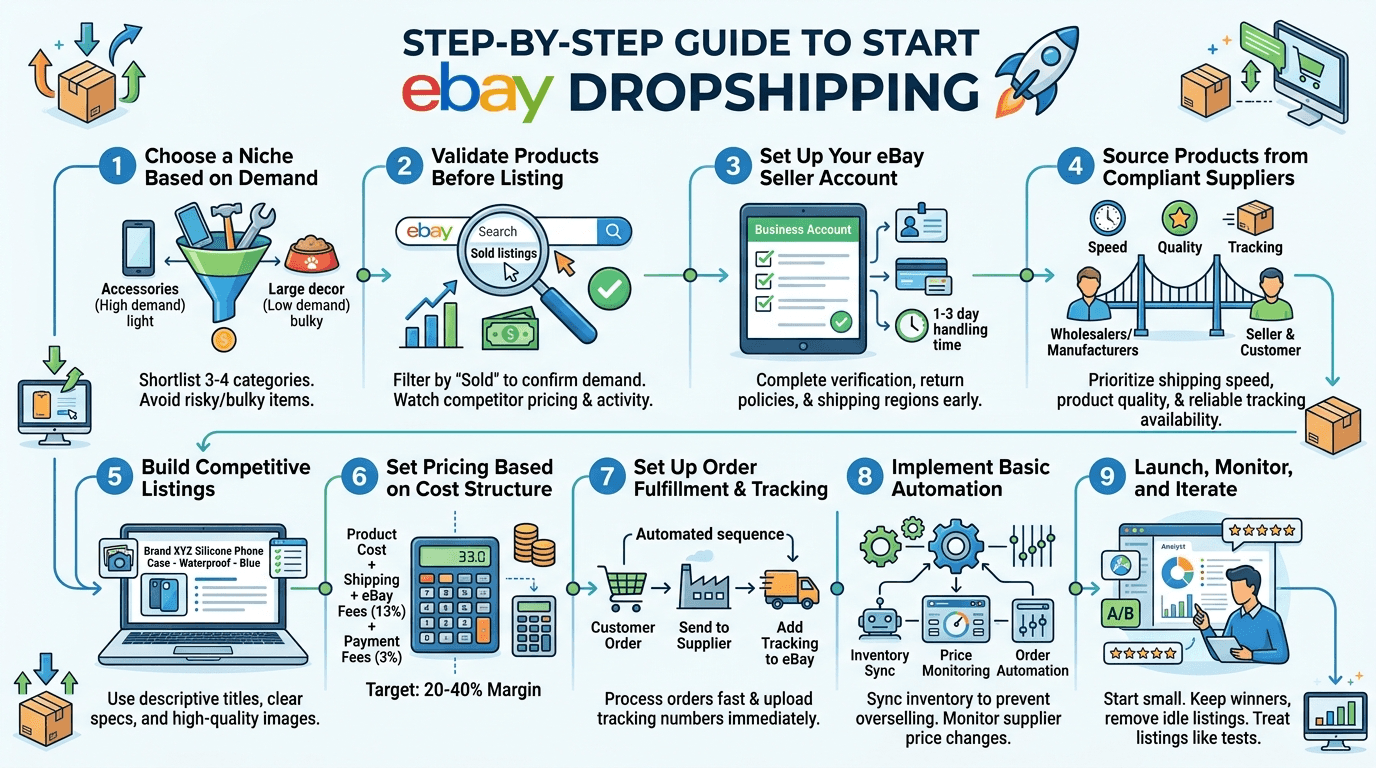
1. Choose a Niche Based on Demand, Not Assumptions
Start by shortlisting 3-4 categories that already have active listings. Do not overthink this part. Look at areas like accessories, home tools, or pet products where items sell daily.
Next, open eBay and search for products within each category. Pay attention to listings with regular sales activity, multiple sellers, and consistent pricing. This tells you demand is stable, not temporary.
Now narrow it down. Remove anything that feels risky or difficult to manage. Branded products, fragile items, or anything with complicated shipping should be avoided early on. You should now have 1 or 2 clear categories left.
For example, if you compare phone accessories and large home decor items, the difference becomes obvious. Accessories are lightweight, easier to ship, and sell more frequently. Large decor items move more slowly and create more delivery issues.
Pick one niche and commit to it. Clarity at this stage makes every next step easier.
2. Validate Products Before Listing
Uploading a product without checking demand first is how listings sit idle.
Search for your product on eBay and filter by sold listings. You want to see steady purchase activity, not a few isolated orders. When multiple sellers are moving the same item consistently, it signals real demand.
Take a closer look at those sellers. Open their listings and observe how they position the product. Pricing, titles, and sales frequency will give you a clearer picture of what is working.
It also helps to look outside eBay. Products gaining traction often appear in active ads across other platforms. That visibility usually reflects broader demand, not just marketplace traffic.
Pay attention to a few key signs:
Several sellers are generating regular sales
A consistent pricing range across listings
No aggressive price drops that squeeze margins
When these signals line up, you are working with data, not assumptions.
You can speed this up by tracking active ads and competitor stores across platforms using WinningHunter. It highlights products gaining traction on channels like Instagram, TikTok, and Meta, which often reflect broader demand patterns. You can then validate those products on eBay using real sales data before listing, rather than relying on trial and error.
To make this more objective, you can measure demand using a simple benchmark:
Sell-through rate = Number of sold listings / Number of active listings
3. Set Up Your eBay Seller Account Properly
Your account setup shapes how eBay treats your listings from day one. A rushed setup often leads to limits that are harder to fix later.
Choose a business account during registration. It gives you more flexibility as your store grows and helps avoid restrictions that personal accounts can run into.
Complete all verification steps early. Identity checks, payment details, and payout settings should be fully configured before you list anything. Delays here can interrupt orders once sales begin.
Then move to your store settings. Make sure your return policy matches eBay's expectations so buyers feel confident placing orders. Set a handling time you can actually maintain, usually between one and three days. Define your shipping regions clearly to avoid confusion or unexpected issues.
These details do more than organize your account. They influence how your listings are ranked and how buyers perceive your store. A properly set up account builds trust, improves visibility, and keeps you eligible for seller protections as you scale.
4. Source Products from Compliant Suppliers
By this point, you have a niche and a set of validated products. The next piece is making sure you can actually deliver them without issues.
Your sourcing choice directly affects how stable your store will be. Even strong products fail when fulfillment is inconsistent.
Work with suppliers that align with eBay’s expectations. Wholesalers, manufacturers, and dedicated dropshipping platforms give you better control over how orders are handled. Retail marketplaces tend to create problems that show up later in the form of delays or mismatched order details.
Once you have a few supplier options, look at how they perform in real conditions. Shipping speed should match what you plan to promise in your listings. Product quality needs to stay consistent across multiple orders. Tracking availability is critical since it feeds directly into your account performance.
These checks may feel small early on. They become decisive once orders start coming in regularly.
5. Build Listings That Compete in Search
Your product might have demand, but the listing decides whether it gets attention or is ignored.
Generic titles are one of the biggest reasons listings fail. Buyers search with intent. Their queries include features, use cases, and specific needs. Your title should reflect that.
Pull wording directly from real search behavior. Combine product type, key feature, and use case in a way that reads naturally and clearly.
The rest of the listing should remove hesitation. A buyer should understand what the product does and why it fits their needs within seconds.
Focus on a few essentials:
Include clear specifications that answer practical questions
Show how the product is used, not just what it looks like.
Use multiple images that make the product easy to evaluate
When your listing aligns with what buyers are already looking for, performance improves.
6. Set Pricing Based on Real Cost Structure
With your listings live, pricing decides whether your sales turn into actual profit or just activity.
Matching competitor prices without knowing your numbers leads to thin or negative margins. Your pricing should come from your cost structure first, then be adjusted to stay competitive.
Break it down clearly for every product:
Product cost from your supplier
Shipping cost based on your delivery promise
eBay fees, which are typically around 13%
Payment processing fees, which are usually close to 3%
Once these are calculated, you get a real picture of your margin.
To stay profitable, aim for:
20 to 40% margin after all costs
Enough buffer to handle returns or refunds
Room to test ads or adjust pricing when needed
Looking at competitor pricing still helps, but it should come after your numbers are clear. When your pricing is built on actual costs, you stay in control as your store grows.
7. Set Up Order Fulfillment and Tracking
At this stage, your store is live, and orders can come in at any time. What you do right after a sale matters more than the sale itself.
The flow is simple. A customer places an order, you send the details to your supplier, the product gets shipped, and tracking is added to eBay. What changes outcomes is how quickly you handle each step.
If you delay placing the order, shipping gets pushed back. If tracking is uploaded late, your account starts losing trust signals.
Keep your process tight:
Send the order to your supplier as soon as it comes in
Upload tracking the moment you receive it
These two actions sound basic, but they directly affect how your listings perform. When orders move smoothly, and tracking stays consistent, your account remains in good standing, and your visibility holds strong.
8. Implement Basic Automation Early
Manual control works at the beginning. It breaks as soon as order volume increases.
The goal of automation is not convenience. It is stability.
Three systems matter most:
Inventory Sync: Your listings should automatically reflect supplier stock. This prevents overselling and cancellations.
Price Monitoring: Supplier costs change more often than expected. Automatic price adjustments protect your margins without constant checking.
Order Automation: Instead of placing orders manually, systems can forward orders directly to your supplier.
Without these, growth creates friction:
Orders get delayed
Margins shrink unnoticed
Listings go out of sync
With them, your store becomes predictable and scalable.
9. Launch, Monitor, and Iterate
The first set of listings is not about making money. It is where you find out if your decisions hold up once real buyers see your products.
So, keep it limited. A small group of listings gives you cleaner signals without noise.
Watch how each product behaves once it is live:
Are people even seeing it, or is it buried in search
When they land on it, do they take action or leave
Does it generate steady orders or just occasional spikes
This is where most sellers get stuck. They keep adding more products without understanding what is already in front of them.
Treat your listings like tests. If something gets attention and converts, build around it. If it sits idle, remove it without hesitation.
eBay Seller Compliance: What’s Allowed and How to Avoid Getting Banned
1. What eBay Actually Allows
eBay permits dropshipping when you source products through suppliers you work with directly. This includes wholesalers, manufacturers, or platforms built for fulfillment.
The supplier handles shipping, but the responsibility stays with you. Delivery speed, tracking accuracy, and product quality all reflect on your account, not the supplier.
2. What Gets Sellers Flagged
Issues usually come from how products are sourced and fulfilled.
Buying from retail sites like Amazon or Walmart after receiving an order
Shipping timelines that do not match what your listing promises
Selling products that fall into restricted or protected categories
Weak performance metrics tied to shipping and customer experience
These patterns do not always cause instant action, but they build up quickly.
3. How Problems Actually Show Up?
Most sellers do not get flagged without warning. The signs show up in small ways first.
A package arrives with branding from another retailer. The buyer notices and raises a complaint. Tracking updates appear late or do not match the expected location. Delivery takes longer than stated.
These issues stack over time.
Visibility drops, listings lose traction, and in some cases, accounts are reviewed or restricted. If you cannot provide clear supplier records when asked, recovery becomes difficult.
4. How to Stay Compliant Without Overthinking It
You do not need a complex system to stay within the rules. You need consistency.
Work with suppliers that ship without retail branding
Make sure tracking is reliable and uploaded on time
Keep invoices and order records organized
Set handling times that match your actual fulfillment speed
Avoid products that commonly trigger complaints or IP issues
When your sourcing and fulfillment stay predictable, compliance stops being a concern and becomes part of your normal workflow.
How to Find Winning Products on eBay?
1. Start With What Is Already Selling
Before you look anywhere else, stay within eBay. The platform already shows you what buyers are paying for.
Search for your product idea and switch to sold listings. What you are trying to spot is consistency. A product that sells every day across multiple sellers tells you far more than something that spikes once.
Pay attention to how stable the pricing looks. When listings sit within a tight range, it usually means demand is steady, and margins are predictable. If prices are all over the place, it becomes harder to maintain profit.
This step filters out weak ideas early.
Certain categories tend to give you a stronger starting point because they combine steady demand with simpler fulfillment.
Electronics accessories: Items like phone mounts, charging solutions, and device add-ons tend to sell frequently and often lead to repeat purchases
Home and DIY tools: Organizational products, small repair tools, and kitchen gadgets show consistent demand across different regions
Pet products: Grooming tools, feeding accessories, and training items benefit from strong buyer intent and repeat buying behavior
Fitness and health accessories: Resistance bands, recovery tools, and home workout gear maintain steady demand with occasional spikes
Smart home and convenience products: Lighting, automation accessories, and security add-ons carry higher perceived value and growing interest
These categories do not guarantee success, but they give you a more stable base to begin your search.
2. Check If You Can Enter Without Getting Buried
A product having competition is not the problem. The question is whether new sellers still have room to gain traction.
Search the product and scan the results page. Look at how listings are presented. In some cases, you will notice that many sellers are using similar images, weak titles, or unclear descriptions.
That is your opening.
If you can present the same product more clearly, bundle it differently, or position it better, you can compete even in a crowded space. On the other hand, if a single seller dominates with strong reviews and high sales volume, entry becomes much harder.
3. Evaluate the Product Before You Commit
Not every product that sells is worth listing. Some create more problems than they are worth.
Here is a simple way to assess viability:
Factor | What to Look For | Why It Matters |
Size and weight | Small and easy to ship | Reduces delays and costs |
Product type | Non-branded or white label | Avoids intellectual property issues |
Use case | Solves a clear problem | Increases conversion rate |
Demand pattern | Steady sales over time | More predictable performance |
Supplier reliability | Consistent stock and tracking | Keeps operations stable |
A product only works if it can actually be fulfilled without issues. Before listing, take a closer look at the supplier behind it. Stock should be consistent, delivery timelines should match what you plan to promise, and tracking must be reliable.
If possible, order a sample before listing. This gives you a clear view of product quality, packaging, and delivery speed. Some products look strong during research but fail once fulfillment begins.
4. Run the Numbers Before You List
A product is not viable unless it leaves room for profit after all costs are included.
Look at the current selling price on eBay, then calculate your actual costs:
Supplier cost
Shipping cost
eBay fees are around 13%
Payment processing fees are around 3%
What remains should leave enough room to absorb returns or small pricing shifts. If profit depends on a heavy markup or leaves no buffer, the product becomes unstable once orders increase.
Pricing should come from your numbers first. Market pricing comes after.
5. Catch Products While They Are Still Growing
By the time a product looks obvious, it is usually crowded.
Better opportunities show up earlier. You will notice new listings appearing, more sellers entering, and growing activity across ads. The product is gaining attention, but it is not saturated yet.
Here, timing starts to work in your favor.
Instead of guessing, you can track what is already picking up momentum. By analyzing active ads and competitor stores, you get a clearer view of which products are gaining traction across platforms. This reduces the need to test blindly and helps you focus on products that already show signs of growth.
Listing Optimization Framework That Drives Sales
A listing does not perform all at once. It works in a sequence. It gets clicked first, then it converts.
Each part of the listing has a specific role.
Title shapes visibility. Your title should reflect how buyers search, not how you would describe the product. Combine the product type, a key feature, and the intended use in a way that reads clearly. A simple structure works well: product plus key feature plus use case.
Images drive attention. The main image decides whether someone stops scrolling. Keep it clean and focused so the product is easy to understand at a glance. Showing how it is used or giving a sense of scale often improves engagement.
Description closes the decision. Once someone clicks, clarity matters more than style. Explain what the product solves, how it is used, and include the details a buyer would look for before making a decision.
When these elements align with buyer intent, listings perform more consistently and stay visible longer.
Final Filtering Checklist Before Listing Any Product
Before you add anything to your store, run it through this quick check. It takes a minute and saves you from listing products that fail later.
Demand is proven through consistent sales, and not occasional spikes
Competition exists, but there is still room to position your listing better
Margins hold after product cost, shipping, and fees are included
The supplier can deliver on time with stable stock and valid tracking
Product does not fall into restricted or intellectual property risk categories
If even one of these does not hold, pause and reassess. A weak product at this stage usually turns into a bigger problem once orders start coming in.
Build a Store That Holds Up
eBay dropshipping still works, but the rules are tighter, and the margin for error is smaller. What separates stable stores from short-lived ones is how well your process holds together once orders begin.
When sourcing is reliable, fulfillment stays consistent, and every product is backed by real demand, growth stops feeling unpredictable. Listings gain traction, performance remains stable, and scaling becomes easier to manage.
The biggest gap shows up in product selection. Guesswork slows progress and creates avoidable risk. Clear data changes that.
With WinningHunter, you can track products that are already gaining traction, analyze how competitors position them, and validate demand before listing. This shortens the path from testing to consistent sales.
If you want your store to grow without constant resets, the advantage comes from choosing the right products before you list them.
FAQs
Is eBay dropshipping allowed in 2026?
Yes, but only when you source from wholesalers or manufacturers with a direct relationship. You are responsible for delivery, tracking, and customer experience. Models that rely on buying from retail sites after a sale do not comply with eBay’s policy.
Can you dropship from Amazon to eBay?
No. This setup exposes retail sourcing through packaging, invoices, and shipping inconsistencies. It goes against eBay’s rules and often leads to listing removal or account issues.
How much does the average eBay dropshipper make?
Income varies based on product selection and execution. Margins typically fall between 20% and 40%, but actual earnings depend on how consistently your listings convert and how well you manage costs.
Do I need an LLC to dropship on eBay?
No, you can start as an individual seller. As your sales grow, registering a business can help with taxes, payouts, and building a more structured operation.
Does eBay ban dropshippers?
eBay does not ban dropshipping itself. It restricts accounts that fail to follow sourcing rules or maintain performance standards. Most issues come from poor fulfillment or policy violations, not the model itself.
Can I make $1000 a month on eBay?
Yes, but it depends on choosing products with real demand and managing fulfillment properly. A few well-performing listings can reach that level, while random testing without structure usually struggles to get there.


We already know what works before you even have the chance to blink!
© 2024 WinningHunter.com